Cloud Optimization Roadmap: How to Reduce Cloud Waste After an Assessment
Most organizations reach the same uncomfortable moment. The assessment is done. The data is in. Hundreds of thousands, sometimes millions, of dollars in cloud waste have surfaced across AWS, Azure, M365, or private infrastructure. Everyone in the room nods. And then someone asks the question that changes the meeting:
“So now what?”
Identifying waste is not the hardest part. Acting on it is. The cloud optimization roadmap is where assessment meets execution and where companies either capture the value or watch it evaporate into the next budget cycle.
Without a clear roadmap, the same pattern repeats. A few obvious issues are fixed. Some licenses are reclaimed. But the bigger modernization work gets deferred. Then someone buys cloud commitments too early, and cloud spend starts creeping back up again.
Here, we give you a practical cloud optimization roadmap for the first 90 days after you find waste. We highlight key steps like separating quick wins from structural changes, putting guardrails in place so teams feel safe acting, and aligning contracts and commitments with the future-state environment you actually want.
The Moment After a Cloud Assessment: Why “Now What?” Matters
A cloud assessment gives you a picture of the environment at a point in time. The environment does not freeze when the assessment ends.
Licenses renew. Teams spin up resources. Projects move. Contracts keep running on assumptions that may no longer fit how the business operates.
When there is no roadmap after the findings, the same thing tends to happen:
- A few obvious issues get cleaned up
- Some licenses get reclaimed
- Bigger modernization work gets pushed out
- Someone buys commitments too early
- Spend starts creeping back up
This is why the moment after the assessment is so important. The decisions you make in the first 90 days determine whether you capture the savings or watch them evaporate into the next budget cycle.
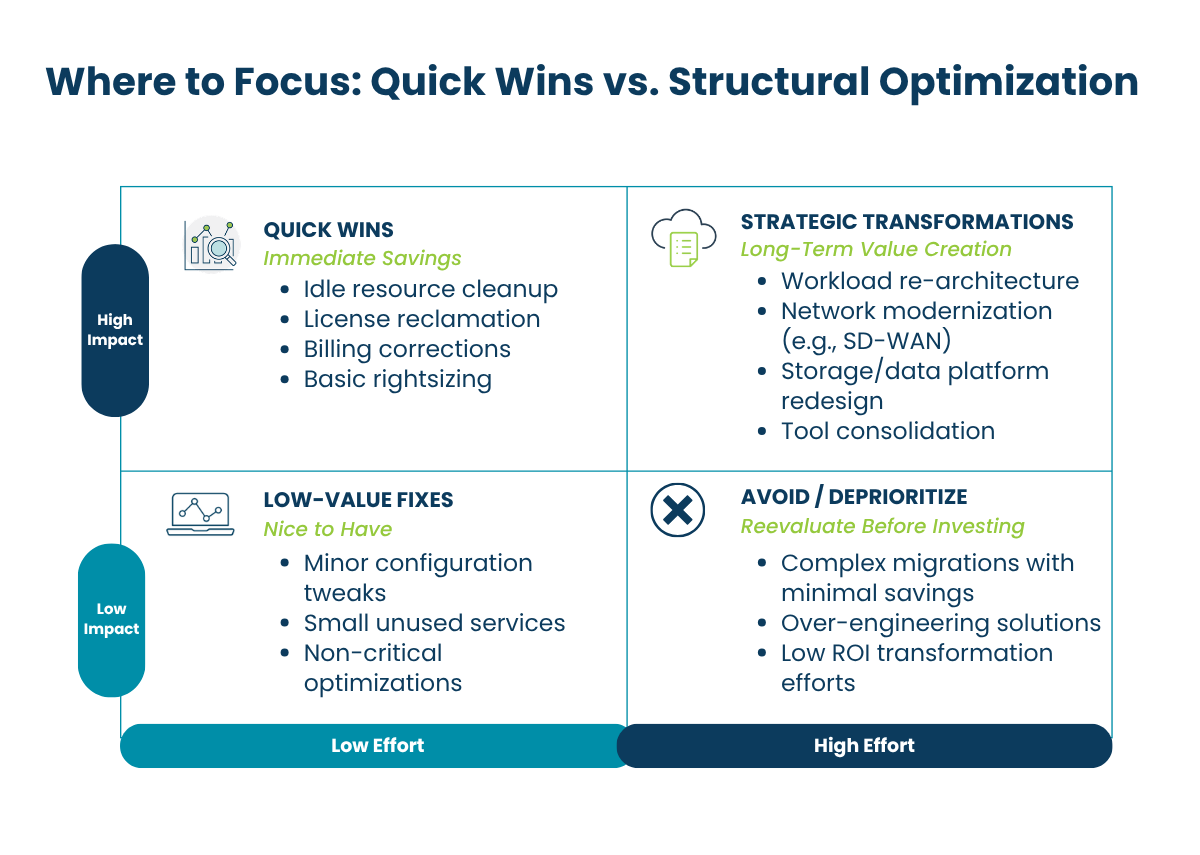
Step 1: Separate Quick Wins from Structural Cloud Optimization Changes
Quick Hits in Your Cloud Optimization Roadmap (30–60 Days)
Quick hits are high-confidence, low-disruption savings you can capture in the first 30 to 60 days. They are usually administrative or configuration changes, not major architecture decisions, and typically include:
- Services billing incorrectly: invoiced charges with no corresponding active use
- Idle or orphaned resources: compute or storage with no active workload
- Redundant licenses: duplicated subscriptions across tools that do the same job
- Right-sizing opportunities: overprovisioned instances that can be scaled down without performance impact
These items require minimal organizational change. The value is immediate, and the work is mostly operational hygiene. On average, Bluewave clients find savings in the 5–8% range on cloud and hyperscaler spend from quick-hit corrections alone.
What to do:
Build a 30- to 60-day workstream around the items that have:
- Clear ownership
- Low operational risk
- Fast validation
- Immediate financial value
Treat that as its own motion. Do not let it get buried inside a larger transformation program.
Transformational Opportunities and Long-Term Savings
The larger savings typically come from structural changes. These take longer and often touch architecture, contracts, or both. But they are often where the real value sits.
That may mean:
- Rearchitecting workloads
- Moving to more cost-effective platforms
- Modernizing storage and data handling
- Consolidating overlapping tools
- Lining up contracts with the future-state environment
This is also where sequencing matters most.
One of the most expensive mistakes organizations make is buying reserved capacity or locking into contracts before cleanup and rationalization are done. If you commit too early, you may be securing a discount on waste you were about to remove.
Question to ask before any commitment: Are we locking in the environment we want, or the one we have not cleaned up yet?
Step 2: Put Guardrails in Place Before You Start Making Changes
Optimization work tends to slow down when teams do not feel confident making changes. Before you start resizing, deleting, migrating, or consolidating anything, tighten the basics.
The core guardrails are:
- Tagging and ownership governance so every resource has a clear owner and purpose
- Rollback protocols so teams know they can safely reverse changes if needed
- Shared dashboards for compute, license, and analytics visibility so everyone works from the same data
- A review workflow before flagged resources are actioned
These steps make the rest of the roadmap executable. Without ownership, recommendations get stuck in discussion. Without rollback plans, even sensible changes feel risky. Without shared visibility, teams keep working from different versions of the truth.
A simple rule that removes a surprising amount of friction: for every optimization item, require an owner, a rollback path, and a review date.
Step 3: Reassess Network and Compute That No Longer Fit
Some of the biggest savings come from stepping back and asking whether parts of the environment still make sense for the business today.
Are Your Network Architectures Overdue for Change?
Network is a common example. Organizations still operating on older MPLS or VPN designs may be paying two to three times more than modern SD-WAN alternatives, often without seeing better resilience in return.
In one scenario, a client that was nearing an MPLS renewal achieved a 30% cost reduction by moving to an SD-WAN approach with improved performance.
The MPLS renewal date was a forcing function. If they had renewed first and optimized later, those savings would have been locked out for the length of the contract.
Is Compute Optimized Beyond Basic Rightsizing?
Compute deserves the same scrutiny. Common opportunities include:
- Moving workloads where it makes economic sense
- Rightsizing production workloads based on actual usage
- Implementing off-hours stop/start automation for dev and test environments
Even simple non-production automation can recover 2 to 4% of total compute spend without major architectural change. The key is to focus on patterns that can be standardized and repeated, not one-off heroic efforts.

Step 4: Align Storage Cost with Data Governance
Storage waste tends to build up and is easy to ignore until either the cost gets large or a security issue brings attention to it.
Common problems include:
- ROT data (redundant, obsolete, trivial) sitting on expensive primary storage
- Cold blob data never moved to lower-cost tiers
- Sensitive data exposure risks
- Labeling gaps that slow governance and AI readiness
This is where cost and governance start to overlap in a very real way. In one Azure environment, we found 49 storage accounts allowing anonymous access, representing nearly half of the estate, with 11 explicitly accessible from the public internet.
A better storage strategy should lower cost, but it should also leave you with a cleaner, more understandable data environment.
Questions for IT leaders to ask:
- What data should not still be here?
- What belongs in a lower-cost tier?
- What is exposed that should not be?
- Where are governance gaps making future work harder?
Step 5: Clean Up License & Tool Sprawl Before Renewals Lock It In
Most environments do not become inefficient because of one bad decision. They become inefficient through accumulation.
Microsoft 365 licensing is a visible example. In one environment, we assessed that:
- Overlapping M365 licenses accounted for $22,080 per month in avoidable spend
- Disabled accounts with active licenses added another $7,620 per month
The larger lesson is that optimization is not only technical. It is also tied to contract timing. If a renewal hits before optimization work is done, you can lock yourself into the wrong cost basis for another full term.
Practical Move: Lay your contract calendar next to your optimization roadmap. If they are not connected, you are likely to miss savings even when the technical case is obvious.
Committed spend has a role in cloud optimization. It just belongs later in the process.
Once the environment has been cleaned up, rationalized, and governed, then it makes sense to use tools like Azure Reservations and Savings Plans for steady-state workloads.
Discounts can range from 10 to 40% on covered compute, but only when those workloads are truly stable and intended to stay in place. However, a more measured starting point is 50 to 60% Reserved Instance coverage for steady 24×7 workloads, expanding only after utilization is validated above 95%.
This sequence matters. Committed spend works best when it follows cleanup and rationalization, not when it substitutes for them.
Your 90-Day Cloud Optimization Roadmap
After cloud waste is identified, the first three months matter more than the assessment deck. Here is a practical approach you can adapt to your organization.

Days 0 to 30: Foundation & Triage
In the first month:
- Separate quick wins from structural opportunities
- Assign owners to high-confidence savings items
- Put tagging, dashboards, and rollback protocols in place
- Review contract dates alongside the findings
The goal in this phase is to create momentum and reduce risk. You want visible progress on obvious savings, while laying the governance foundation that will support deeper changes.
Days 30 to 60: Capture Low-Risk Savings
In the next 30 days:
- Capture low-risk savings from idle resources, license cleanup, and rightsizing
- Start reviewing infrastructure and storage areas where the economics are clearly off
- Identify governance gaps that are slowing action
This is where many of the quick hits get executed. You should see measurable reductions in monthly spend and a clearer view into where the bigger opportunities sit.
Days 60 to 90: Orchestrate Structural Change
In the final 30 days of this window:
- Prioritize modernization work that needs broader coordination
- Build a contract and commitment strategy around the future-state environment
- Decide which workloads are stable enough to support committed spend
Don’t just aim to reduce this quarter’s invoice. Build a model that keeps spend from drifting back up.
By the end of 90 days, you should have:
- A clear split between quick wins and structural initiatives
- Guardrails that give teams confidence to act
- A contract and commitment plan aligned with your optimized footprint
Who Shapes Your Cloud Cost Optimization Plan
A roadmap helps you understand what to do after waste is identified, but it is also worth asking who is shaping that roadmap in the first place. The recommendations you receive are only as objective as the assessment model behind them.
In the next article, we look at the difference between vendor-neutral and vendor-led assessments and why that distinction matters.
How Bluewave Helps You Turn Findings into Action
Many organizations stall between assessment and execution. The findings are clear, but teams are already stretched, and no one owns the roadmap end-to-end.
We help organizations move from cloud assessment to execution. Our Cloud Optimization Assessment surfaces cost, security, governance, and data risks, then translates those findings into a prioritized, sequenced plan your team can actually run.
From quick-hit billing corrections to complex network, storage, and licensing changes, we act as a partner to help you. If you are sitting on a deck of cloud waste findings and wondering what comes next, this is the moment to move.
Turn Cloud Waste into Measurable Savings: Schedule a cloud optimization review with Bluewave to identify immediate cost savings and build your execution roadmap.
Cloud Optimization FAQs
Q: What is cloud optimization?
A: Cloud optimization is the process of reducing unnecessary cloud spend while improving performance, scalability, and governance. It involves identifying waste, rightsizing resources, eliminating unused services, and aligning cloud usage with actual business needs.
Q: How do you reduce cloud waste after an assessment?
A: After identifying cloud waste, the most effective approach is to follow a structured roadmap:
- Capture quick wins like idle resource cleanup and license reclamation
- Implement governance guardrails such as tagging and ownership
- Address structural issues like architecture, storage, and network design
- Align contracts and commitments only after the environment is optimized
This ensures savings are realized and sustained over time.
Q: What is a cloud optimization roadmap?
A: A cloud optimization roadmap is a step-by-step plan that outlines how to reduce cloud costs and improve efficiency over a defined period—typically 90 days. It prioritizes quick wins, identifies longer-term transformation opportunities, and aligns technical changes with financial and contractual decisions.
Q: How long does cloud cost optimization take?
A: Initial savings can typically be realized within 30 to 60 days through quick wins like rightsizing and eliminating unused resources. However, full cloud optimization, including architectural and contractual improvements, usually takes 90 days or more, depending on the complexity of the environment.
Q: What are the most common sources of cloud waste?
A: Common sources of cloud waste include:
- Idle or orphaned compute and storage resources
- Overprovisioned instances
- Unused or duplicated software licenses
- Inefficient storage tiers
- Premature or misaligned cloud commitments
These issues often accumulate over time without strong governance.
Q: What is FinOps and how does it relate to cloud optimization?
A: FinOps (Financial Operations) is a framework that brings together finance, IT, and business teams to manage cloud costs collaboratively. It enables organizations to make data-driven decisions about cloud usage, improve cost accountability, and continuously optimize spend as environments evolve.
Q: When should you commit to reserved instances or savings plans?
A: Committed cloud spend, such as reserved instances or savings plans, should only be implemented after the environment has been cleaned up and stabilized. Committing too early can lock in unnecessary costs. A best practice is to validate consistent usage before increasing commitment levels.
Q: Why does cloud spend increase again after optimization?
A: Cloud spend often creeps back up when governance is not maintained. Without clear ownership, monitoring, and accountability, teams continue provisioning resources, and waste reaccumulates. Sustainable optimization requires ongoing visibility, guardrails, and regular review cycles.
Q: What role does governance play in cloud optimization?
A: Governance is the foundation of effective cloud optimization. It ensures every resource has an owner, usage is tracked, and policies are enforced. Strong governance enables teams to act confidently, reduces risk, and prevents waste from returning after initial optimization efforts.
Q: Do you need a partner for cloud optimization?
A: While some organizations manage optimization internally, many benefit from a partner who can accelerate execution, identify hidden savings opportunities, and align technical changes with financial outcomes. A structured approach and external expertise often lead to faster and more sustainable results.
Author
Kristofor Hogaboom brings 25+ years of experience designing and...
Read Full Bio

