Cloud Optimization Roadmap: How to Reduce Cloud Waste in 90 Days

Cloud Optimization Roadmap: How to Reduce Cloud Waste After an Assessment

Most organizations reach the same uncomfortable moment. The assessment is done. The data is in. Hundreds of thousands, sometimes millions, of dollars in cloud waste have surfaced across AWS, Azure, M365, or private infrastructure. Everyone in the room nods. And then someone asks the question that changes the meeting:

 “So now what?”

Identifying waste is not the hardest part. Acting on it is. The cloud optimization roadmap is where assessment meets execution and where companies either capture the value or watch it evaporate into the next budget cycle.

Without a clear roadmap, the same pattern repeats. A few obvious issues are fixed. Some licenses are reclaimed. But the bigger modernization work gets deferred. Then someone buys cloud commitments too early, and cloud spend starts creeping back up again.

Here, we give you a practical cloud optimization roadmap for the first 90 days after you find waste. We highlight key steps like separating quick wins from structural changes, putting guardrails in place so teams feel safe acting, and aligning contracts and commitments with the future-state environment you actually want.

The Moment After a Cloud Assessment: Why “Now What?” Matters

A cloud assessment gives you a picture of the environment at a point in time. The environment does not freeze when the assessment ends.

Licenses renew. Teams spin up resources. Projects move. Contracts keep running on assumptions that may no longer fit how the business operates.

When there is no roadmap after the findings, the same thing tends to happen:

  • A few obvious issues get cleaned up
  • Some licenses get reclaimed
  • Bigger modernization work gets pushed out
  • Someone buys commitments too early
  • Spend starts creeping back up

This is why the moment after the assessment is so important. The decisions you make in the first 90 days determine whether you capture the savings or watch them evaporate into the next budget cycle.
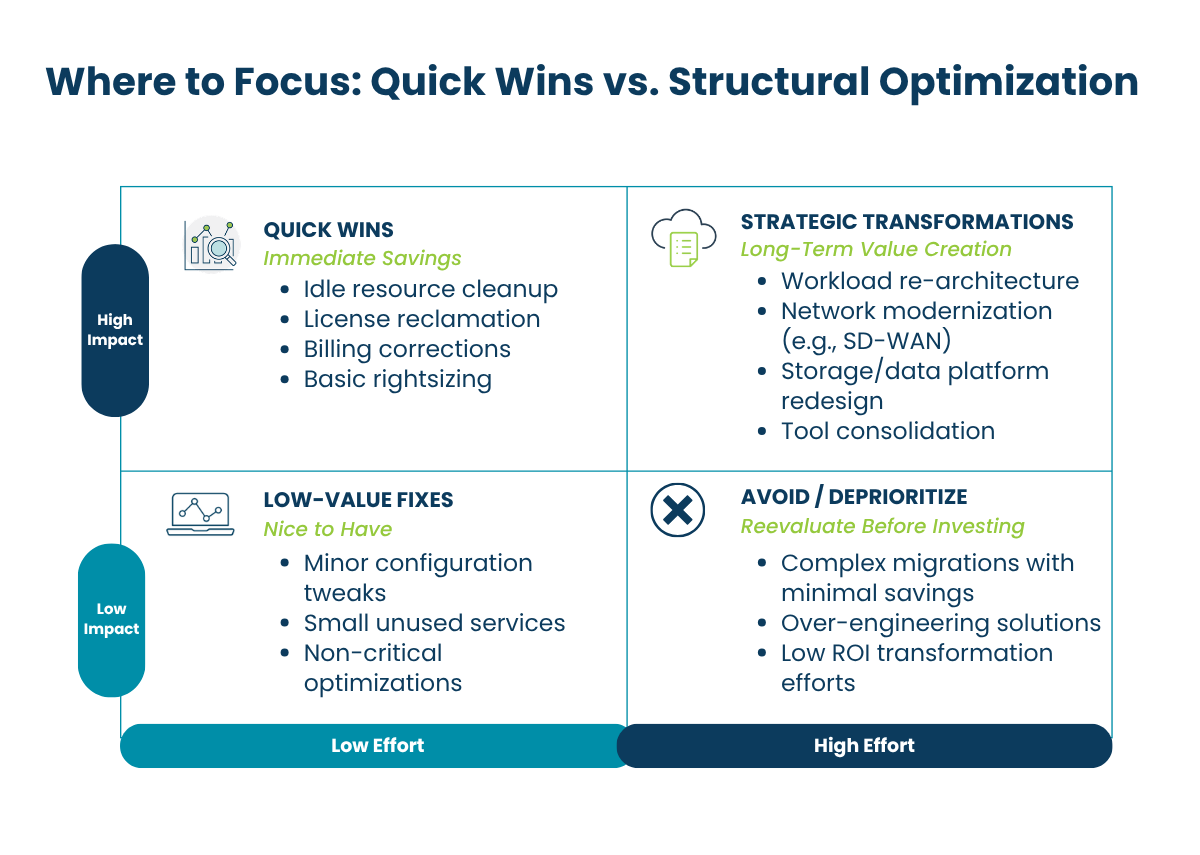
Cloud Optimization Quick Wins vs. Structural Change Matrix

Step 1: Separate Quick Wins from Structural Cloud Optimization Changes

Quick Hits in Your Cloud Optimization Roadmap (30–60 Days)

Quick hits are high-confidence, low-disruption savings you can capture in the first 30 to 60 days. They are usually administrative or configuration changes, not major architecture decisions, and typically include:

  • Services billing incorrectly: invoiced charges with no corresponding active use
  • Idle or orphaned resources: compute or storage with no active workload
  • Redundant licenses: duplicated subscriptions across tools that do the same job
  • Right-sizing opportunities: overprovisioned instances that can be scaled down without performance impact

These items require minimal organizational change. The value is immediate, and the work is mostly operational hygiene. On average, Bluewave clients find savings in the 5–8% range on cloud and hyperscaler spend from quick-hit corrections alone.

What to do:

Build a 30- to 60-day workstream around the items that have:

  • Clear ownership
  • Low operational risk
  • Fast validation
  • Immediate financial value

Treat that as its own motion. Do not let it get buried inside a larger transformation program.

Transformational Opportunities and Long-Term Savings

The larger savings typically come from structural changes. These take longer and often touch architecture, contracts, or both. But they are often where the real value sits.

That may mean:

  • Rearchitecting workloads
  • Moving to more cost-effective platforms
  • Modernizing storage and data handling
  • Consolidating overlapping tools
  • Lining up contracts with the future-state environment

This is also where sequencing matters most.

One of the most expensive mistakes organizations make is buying reserved capacity or locking into contracts before cleanup and rationalization are done. If you commit too early, you may be securing a discount on waste you were about to remove.

Question to ask before any commitment: Are we locking in the environment we want, or the one we have not cleaned up yet?

Step 2: Put Guardrails in Place Before You Start Making Changes

Optimization work tends to slow down when teams do not feel confident making changes. Before you start resizing, deleting, migrating, or consolidating anything, tighten the basics.

The core guardrails are:

  • Tagging and ownership governance so every resource has a clear owner and purpose
  • Rollback protocols so teams know they can safely reverse changes if needed
  • Shared dashboards for compute, license, and analytics visibility so everyone works from the same data
  • A review workflow before flagged resources are actioned

These steps make the rest of the roadmap executable. Without ownership, recommendations get stuck in discussion. Without rollback plans, even sensible changes feel risky. Without shared visibility, teams keep working from different versions of the truth.

A simple rule that removes a surprising amount of friction: for every optimization item, require an owner, a rollback path, and a review date.

Step 3: Reassess Network and Compute That No Longer Fit

Some of the biggest savings come from stepping back and asking whether parts of the environment still make sense for the business today.

Are Your Network Architectures Overdue for Change?

Network is a common example. Organizations still operating on older MPLS or VPN designs may be paying two to three times more than modern SD-WAN alternatives, often without seeing better resilience in return.

In one scenario, a client that was nearing an MPLS renewal achieved a 30% cost reduction by moving to an SD-WAN approach with improved performance.

The MPLS renewal date was a forcing function. If they had renewed first and optimized later, those savings would have been locked out for the length of the contract.

Is Compute Optimized Beyond Basic Rightsizing?

Compute deserves the same scrutiny. Common opportunities include:

  • Moving workloads where it makes economic sense
  • Rightsizing production workloads based on actual usage
  • Implementing off-hours stop/start automation for dev and test environments

Even simple non-production automation can recover 2 to 4% of total compute spend without major architectural change. The key is to focus on patterns that can be standardized and repeated, not one-off heroic efforts.

The Foundation That Makes Cloud Optimization Work - layered diagram

Step 4: Align Storage Cost with Data Governance

Storage waste tends to build up and is easy to ignore until either the cost gets large or a security issue brings attention to it.

Common problems include:

  • ROT data (redundant, obsolete, trivial) sitting on expensive primary storage
  • Cold blob data never moved to lower-cost tiers
  • Sensitive data exposure risks
  • Labeling gaps that slow governance and AI readiness

This is where cost and governance start to overlap in a very real way. In one Azure environment, we found 49 storage accounts allowing anonymous access, representing nearly half of the estate, with 11 explicitly accessible from the public internet.

A better storage strategy should lower cost, but it should also leave you with a cleaner, more understandable data environment.

Questions for IT leaders to ask:

  • What data should not still be here?
  • What belongs in a lower-cost tier?
  • What is exposed that should not be?
  • Where are governance gaps making future work harder?

Step 5: Clean Up License & Tool Sprawl Before Renewals Lock It In

Most environments do not become inefficient because of one bad decision. They become inefficient through accumulation.

Microsoft 365 licensing is a visible example. In one environment, we assessed that:

  • Overlapping M365 licenses accounted for $22,080 per month in avoidable spend
  • Disabled accounts with active licenses added another $7,620 per month

The larger lesson is that optimization is not only technical. It is also tied to contract timing. If a renewal hits before optimization work is done, you can lock yourself into the wrong cost basis for another full term.

Practical Move: Lay your contract calendar next to your optimization roadmap. If they are not connected, you are likely to miss savings even when the technical case is obvious.

Step 6: Commit Only After the Footprint Stabilizes

Committed spend has a role in cloud optimization. It just belongs later in the process.

Once the environment has been cleaned up, rationalized, and governed, then it makes sense to use tools like Azure Reservations and Savings Plans for steady-state workloads.

Discounts can range from 10 to 40% on covered compute, but only when those workloads are truly stable and intended to stay in place. However, a more measured starting point is 50 to 60% Reserved Instance coverage for steady 24×7 workloads, expanding only after utilization is validated above 95%.

This sequence matters. Committed spend works best when it follows cleanup and rationalization, not when it substitutes for them.

Your 90-Day Cloud Optimization Roadmap

After cloud waste is identified, the first three months matter more than the assessment deck. Here is a practical approach you can adapt to your organization.

Your First 90 Days After Identifying Cloud Waste - Timeline

Days 0 to 30: Foundation & Triage

In the first month:

  • Separate quick wins from structural opportunities
  • Assign owners to high-confidence savings items
  • Put tagging, dashboards, and rollback protocols in place
  • Review contract dates alongside the findings

The goal in this phase is to create momentum and reduce risk. You want visible progress on obvious savings, while laying the governance foundation that will support deeper changes.

Days 30 to 60: Capture Low-Risk Savings

In the next 30 days:

  • Capture low-risk savings from idle resources, license cleanup, and rightsizing
  • Start reviewing infrastructure and storage areas where the economics are clearly off
  • Identify governance gaps that are slowing action

This is where many of the quick hits get executed. You should see measurable reductions in monthly spend and a clearer view into where the bigger opportunities sit.

Days 60 to 90: Orchestrate Structural Change

In the final 30 days of this window:

  • Prioritize modernization work that needs broader coordination
  • Build a contract and commitment strategy around the future-state environment
  • Decide which workloads are stable enough to support committed spend

Don’t just aim to reduce this quarter’s invoice. Build a model that keeps spend from drifting back up.

By the end of 90 days, you should have:

  • A clear split between quick wins and structural initiatives
  • Guardrails that give teams confidence to act
  • A contract and commitment plan aligned with your optimized footprint

Who Shapes Your Cloud Cost Optimization Plan

A roadmap helps you understand what to do after waste is identified, but it is also worth asking who is shaping that roadmap in the first place. The recommendations you receive are only as objective as the assessment model behind them.

In the next article, we look at the difference between vendor-neutral and vendor-led assessments and why that distinction matters.

How Bluewave Helps You Turn Findings into Action

Many organizations stall between assessment and execution. The findings are clear, but teams are already stretched, and no one owns the roadmap end-to-end.

We help organizations move from cloud assessment to execution. Our Cloud Optimization Assessment surfaces cost, security, governance, and data risks, then translates those findings into a prioritized, sequenced plan your team can actually run.

From quick-hit billing corrections to complex network, storage, and licensing changes, we act as a partner to help you. If you are sitting on a deck of cloud waste findings and wondering what comes next, this is the moment to move.

Turn Cloud Waste into Measurable Savings: Schedule a cloud optimization review with Bluewave to identify immediate cost savings and build your execution roadmap.

Cloud Optimization FAQs

Q: What is cloud optimization?

A: Cloud optimization is the process of reducing unnecessary cloud spend while improving performance, scalability, and governance. It involves identifying waste, rightsizing resources, eliminating unused services, and aligning cloud usage with actual business needs.

Q: How do you reduce cloud waste after an assessment?

A: After identifying cloud waste, the most effective approach is to follow a structured roadmap:

  • Capture quick wins like idle resource cleanup and license reclamation
  • Implement governance guardrails such as tagging and ownership
  • Address structural issues like architecture, storage, and network design
  • Align contracts and commitments only after the environment is optimized

This ensures savings are realized and sustained over time.

Q: What is a cloud optimization roadmap?

A: A cloud optimization roadmap is a step-by-step plan that outlines how to reduce cloud costs and improve efficiency over a defined period—typically 90 days. It prioritizes quick wins, identifies longer-term transformation opportunities, and aligns technical changes with financial and contractual decisions.

Q: How long does cloud cost optimization take?

A: Initial savings can typically be realized within 30 to 60 days through quick wins like rightsizing and eliminating unused resources. However, full cloud optimization, including architectural and contractual improvements, usually takes 90 days or more, depending on the complexity of the environment.

Q: What are the most common sources of cloud waste?

A: Common sources of cloud waste include:

  • Idle or orphaned compute and storage resources
  • Overprovisioned instances
  • Unused or duplicated software licenses
  • Inefficient storage tiers
  • Premature or misaligned cloud commitments

These issues often accumulate over time without strong governance.

Q: What is FinOps and how does it relate to cloud optimization?

A: FinOps (Financial Operations) is a framework that brings together finance, IT, and business teams to manage cloud costs collaboratively. It enables organizations to make data-driven decisions about cloud usage, improve cost accountability, and continuously optimize spend as environments evolve.

Q: When should you commit to reserved instances or savings plans?

A: Committed cloud spend, such as reserved instances or savings plans, should only be implemented after the environment has been cleaned up and stabilized. Committing too early can lock in unnecessary costs. A best practice is to validate consistent usage before increasing commitment levels.

Q: Why does cloud spend increase again after optimization?

A: Cloud spend often creeps back up when governance is not maintained. Without clear ownership, monitoring, and accountability, teams continue provisioning resources, and waste reaccumulates. Sustainable optimization requires ongoing visibility, guardrails, and regular review cycles.

Q: What role does governance play in cloud optimization?

A: Governance is the foundation of effective cloud optimization. It ensures every resource has an owner, usage is tracked, and policies are enforced. Strong governance enables teams to act confidently, reduces risk, and prevents waste from returning after initial optimization efforts.

Q: Do you need a partner for cloud optimization?

A: While some organizations manage optimization internally, many benefit from a partner who can accelerate execution, identify hidden savings opportunities, and align technical changes with financial outcomes. A structured approach and external expertise often lead to faster and more sustainable results.

“Fire Your Cloud, Not Your Employees”: Funding Modernization Through VMware Cost Optimization

When Your VMware Bill Threatens Your Headcount

If your next VMware renewal quote made your stomach drop, you are not alone. After Broadcom’s program changes, many IT leaders are seeing limited VCF-only options and renewal quotes that are 2–10x higher than what they paid before.

At the same time, strict VCF 9 hardware requirements and a tougher HCL are colliding with 30–80% jumps in hardware prices and longer lead times. The result seems to be an ugly set of tradeoffs. Pay the bill and lock in for five years. Delay modernization. Or start talking about “rightsizing” your team to free up budget.

There’s a better way. As Deepak Ahuja of OneMind put it in our recent webinar, the mindset should be: “Fire your cloud, not your employees.

So, the real choice is whether you re-platform on VMware under tighter lock-in and higher long-term costs, or you re-platform strategically, using this forced change to reduce spend and align your stack with where you and your organization actually want to be.

By attacking waste and overspending in your VMware and infrastructure estate, you can protect your people and create a more flexible architecture than you have today.

TL;DR

  • VMware renewals are spiking due to Broadcom’s changes, VCF-only offers, and stricter hardware requirements, turning “do nothing” into an expensive, long-term commitment.
  • Cutting headcount to pay for infrastructure is backwards; you can free up significant budget by attacking VMware and hardware waste first.
  • Reusing viable hardware and right-sizing your VCF footprint can delay or shrink refreshes, buying you time and lowering total spend.
  • KVM/OpenStack and related platforms are now enterprise-ready, giving you lower-cost landing zones for targeted workload moves without sacrificing support.
  • With the right partners and funding programs, a VMware cost optimization assessment can turn renewal panic into a 12-month modernization plan that protects your people and accelerates your roadmap.


View the full webinar replay here!

The New VMware Economics: Why This Time Really is Different

VCF 9 is not just another update; it is a re-platform

VCF 9 is often framed as the “next version” of VMware. In practice, it is a full-stack, cloud-like platform change. However, our partners and experts emphasize that VCF 9 is not a simple in-place upgrade; it is a re-platform to a full-stack cloud architecture.

That has real operational consequences:

  • Architecture: Cluster design, networking, and storage are aligned to a cloud-style stack, not just vSphere plus some add-ons.
  • Tooling: Monitoring, automation, and lifecycle tools shift to match the new stack.
  • DR and backup: Even if you stay with VMware, DR and backup platforms may need to change. For example, Zerto has lost kernel access in some scenarios, forcing re-evaluation of DR tooling.

In other words, whether you stay or go, there is a platform change ahead. Treating VCF 9 like a routine patch release is what gets teams blindsided.

Longer, more expensive commitments

In the field, many customers now report that VCF is effectively the only SKU they see, and often only as a five-year subscription option.

Some organizations that bought themselves a one- or two-year “runway” with VVF licensing after the initial Broadcom changes are now at the end of that bridge and feel like they need to make a decision.

That combination of fewer options, higher price points, and longer terms means that “doing nothing” has become a very aggressive bet on your future architecture and budget.

Hardware pressures are closing the window faster

At the same time, hardware is no longer a neutral backdrop. In our webinar, Isaiah Hogberg, Deepak Ahuja, and Martin Gale described:

  • Strict VCF 9 hardware requirements tied to a new HCL.
  • Many customers who refreshed 18–24 months ago are now learning their gear may not be viable for VCF 9 long-term.
  • 30–80% increases in hardware prices and extended lead times even from top OEMs.

The “refresh and stay” strategy that once felt safe can now be the most expensive move on the board.

Why “Cut People, Not Platforms” Is Backwards

When renewals spike, the knee-jerk reaction in many organizations is to look at headcount first. That might close a short-term budget gap, but it often increases your long-term risk:

  • You lose the people who understand your systems and environment best.
  • You slow down modernization when you need it most.
  • You end up paying more for external help to do what your team could have done.

The line, “Fire your cloud, not your employees,” is more than a quip.

It’s a call to intentionally sequence your cuts. Start by eliminating things like inefficient licensing and overlapping tools. Then use savings to fund the transformation you actually need, instead of mortgaging your future for another VMware cycle.

In the webinar session, Martin added a key nuance: “You only do a full hypervisor/platform change once or twice in your career; partners do it every day.”

If you try to white-knuckle it alone, you pay a heavy “DIY tax” in time, risk, and opportunity cost. Leaning on partners who live and breathe VMware, KVM, and cloud migrations shrinks that risk and gives you better leverage in vendor discussions.

Where VMware Costs Are Hiding in Your Environment

1. License and subscription sprawl

Broadcom’s shift means many customers now face:

  • Consolidated, all-in VCF bundles (compute, storage, management) instead of modular components.
  • Pricing structures that drive up the base platform cost, often 2–10x over previous spend.
  • Five-year commitments as the default, not the exception.

If your footprint is sized for peak rather than realistic demand, those multipliers hit your budget even harder.

2. Hardware refresh and capacity planning

Strict VCF 9 hardware requirements and a tighter HCL mean many environments can’t simply “lift and shift” to the new stack on existing gear.

That drives cost in two ways: earlier-than-planned refreshes and overprovisioned capacity.

Without careful planning, you end up paying for new hardware and a more expensive software stack at the same time.

3. Tooling, DR, and backup changes

VCF 9 also shakes up the ecosystem around VMware. This forces many organizations to re-evaluate DR, backup, and replication platforms regardless of whether they stay on VMware or not.

Those “secondary” costs rarely show up in the initial renewal quote, but they hit the budget soon after.

4. Operational overhead and the “DIY tax”

Most IT teams will only manage a full hypervisor or platform change once or twice in their careers, whereas partners like TierPoint and OneMind, as well as many others that we connect our clients with, do it daily.

That gap shows up as:

  • Longer assessment and decision cycles.
  • Slower migrations with more trial-and-error.
  • Higher risk of misconfigurations and outages.

In a renewal cycle where you already feel short on runway, paying the DIY tax is a luxury you probably can’t afford.

Four Levers to Fund Modernization Through VMware Cost Optimization

Lever 1 – Right-Size and Re-Tier Your VMware Footprint

Before you accept a sky-high renewal quote, ask:

  • Where are we over-provisioned on cores, clusters, or memory?
  • Which workloads actually require VMware, and which could live elsewhere?

Practical moves include:

  • Reducing cores and clusters in lightly used environments.
  • Shifting non-critical workloads off VMware to lower-cost platforms.
  • Avoiding new five-year VCF 9 commitments until you have a clear roadmap.

In the webinar, Isaiah described using their own license pools to extend VMware support on a customer’s existing hardware, effectively buying them a year to design a better strategy instead of rushing into a bad deal.

That kind of creative licensing can create six- or twelve-month breathing room at a much lower cost.

Lever 2 – Reuse Viable Hardware Before You Buy More

If you’re refreshing hardware before you’ve proven you actually need to, you’re burning modernization budget. In a market where server prices are inflated, “reuse what you already own before you buy more” should be a default rule, not an afterthought.

Deepak shared a retail customer example where about 95% of the hardware was still viable even though VMware renewal pricing had become unsustainable.

Rather than default to a full refresh, they ran a three-week POC on the existing hardware to prove performance and stability on an alternative KVM-based platform, then built an execution plan that reused those servers instead of replacing them.

The outcome was major capex avoidance and enough freed-up budget and time to re-platform legacy applications rather than simply re-license them.

Lever 3 – Move Targeted Workloads to KVM/OpenStack Platforms

A year ago, many VMware shops viewed KVM-based platforms as interesting but immature. That has changed.

A growing set of customers are now leaning into KVM-based architectures, either on-prem or in the cloud, often built on OpenStack platforms like Platform9. These platforms now run at large enterprises like Moody’s and CERN, with robust support models.

The key point here is that this is not science-project territory anymore. With the right partners, KVM/OpenStack moves can be a safe, supported way to reduce VMware dependency and redirect spend toward modernization.

Lever 4 – Tap Cloud and MAP Funding to Underwrite the Transition

Not all modernization dollars have to come from your own budget. If you’re not chasing MAP and similar cloud funding, you’re leaving free modernization dollars on the table.

We connect our customers with an array of partners who know how to align modernization goals with these funding programs, so you’re not shouldering the full cost yourself.

In the webinar, Martin shared a story of a customer who wanted a hybrid architecture: some infrastructure in Azure, some outside.

We helped unlock six figures of MAP funding to underwrite not only the migration but also the heavier “interrogation” work needed to move from VMs to a resource or container platform.

In effect, the cloud provider helped pay for assessment and discovery, refactoring select workloads toward containers, and the early phases of the hybrid design.

When To Exit VMware vs. When To Optimize and Stay

A simple decision framework can help your team choose:

Consider a targeted exit from VMware if:

  • Renewal quotes are 2–10x higher (or more) than current spend.
  • Hardware constraints are severe and would require massive refresh.
  • You are ready to tolerate a platform change in exchange for long-term savings and flexibility.

Consider an optimize-and-stay strategy if:

  • You can secure favorable VCF 9 terms.
  • You can reuse a meaningful portion of existing hardware.
  • VCF 9 aligns with your desired cloud-like operating model and service catalog.

In both cases, doing nothing is rarely neutral. It usually means deeper lock-in at a worse price and less freedom to modernize later.

What You Get from a Bluewave VMware Cost Optimization Assessment

A structured assessment with Bluewave and our partners is designed to give you clarity and options. You can expect:

  • Current-state VMware and hardware inventory
  • Scenario modeling across VCF 9, KVM/OpenStack, and hyperscalers
  • Partner-aligned roadmap
  • Funding and timeline recommendations

Want to hear the full discussion that inspired this post? Watch the on-demand webinar “VMware, One Year Later: What Your Options Look Like in 2026.”

Or if you are ready to see how much modernization budget is hiding in your VMware spend, request a VMware Impact Assessment with Bluewave and our partners.

Protect Your People By Optimizing Your Platform

The VMware world has changed, and standing still is no longer safe. But sacrificing your team to pay for your platform is the most expensive choice of all.

By right-sizing your VMware footprint, you can fund modernization from savings instead of headcount.

Or, as said in the beginning, “Fire your cloud, not your employees.

If your next VMware renewal has you worried about both budget and people, now is the moment to get a clear picture of your options. A short discovery call or cost optimization assessment with us can show you exactly how much transformation capital is already sitting in your current VMware stack.

Avoiding Vendor Lock-In: Rethinking Your Hypervisor Strategy

Why Your Hypervisor Strategy Suddenly Matters

You built your environment on VMware because it felt safe. Now, changes in Broadcom’s pricing, bundles, and contract terms make avoiding vendor lock-in a board-level topic rather than an architectural detail. Renewal numbers climb, and your options narrow at the exact moment your CFO demands cuts.

That pressure creates real risk. If you treat VMware renewal as a line item, you may lock in five more years of cost and technical debt. You keep hardware you do not need and delay modernization.

There is a better path. By rethinking your hypervisor strategy around openness, supported alternatives, and a multi-hypervisor model, you can turn this disruption into a chance to reduce spend, improve resilience, and modernize on your own terms. This is where a clear strategy for avoiding vendor lock-in becomes your advantage.


Avoiding Vendor Lock-In Starts at the Hypervisor

For most mid-market and enterprise teams, VMware still sits at the center of on-premises and hosted infrastructure. That is exactly why Broadcom’s changes hurt. VMware has eliminated perpetual licenses, pushed higher minimum core counts, and bundled features into large, expensive suites that many teams do not fully need.

In practice, that means:

  • Renewal quotes that jump two to three times for the same workloads
  • Edge and remote sites that now require large minimum core licensing, even for small clusters
  • Fewer purchasing paths, which reduces your negotiation leverage

“Do nothing” no longer feels neutral. It becomes an active decision to stay locked into a proprietary stack that controls both your technology roadmap and your cost curve.

A modern hypervisor strategy does not mean a reckless VMware exit. It means designing your environment so that any one vendor – including VMware – cannot dictate every move you make. That is the essence of avoiding vendor lock-in.

For a deeper breakdown of what changed with VMware, see The Big Changes to VMware in 2025: What you need to know.


TL;DR Key Takeaways For Avoiding Vendor Lock-In at the Hypervisor Layer

  • Treat VMware renewal as a strategic decision, not a renewal task
  • Use data-driven assessments to understand cost, risk, and options before you commit
  • Diversify with supported alternatives such as managed Proxmox, SaaS managed KVM, and CloudStack-based IaaS instead of picking a new single vendor
  • Tie every hypervisor move to broader goals like DR, cyber resilience, cloud, and AI infrastructure
  • Partner with an independent advisor who helps you design and execute a mix that fits your environment
Step-by-Step VMWare Migration Playbook
Step 1: Baseline & Prioritize Inventory VMs, dependencies, and data, tier workloads (Tier-1/2/3), set RPO/RTO, and flag legacy or tricky items that may not port cleanly.
Step 2: Readiness Stand up the new hypervisor, validate core services, then run a small “golden” test VM to prove I/O, networking, snapshots, and backup/restore end to end.
Step 3: Protect & Ensure Safety Confirm backup and recovery on both platforms, create immutable copies, and test restores so any VM can roll back to a known good state.
Step 4: Run Pilot Migrations Migrate low-risk workloads first using V2V tools or clean restores, then validate app behavior, performance, security, and day-two operations on the new stack.
Step 5: Prove DR & Compliance Execute tabletop and full failover/failback tests on the target platform, capturing evidence that RPO/RTO, security, and compliance requirements are met.
Step 6: Phased Cutover with Rollback Migrate in waves grouped by environment or application, with a defined rollback plan and a live runbook to capture issues and lessons learned.
Step 7: Decommission & Optimize After a stability window, decommission the old platform, right-size resources, tune backup policies, and tighten cost controls to lock in long-term gains.

Here’s a checklist version to help you keep your migration on track:

Click here to download

Find The Real Cost of Staying on a Single Hypervisor

Before you move a single workload, you need hard numbers. Most teams underestimate the true all-in cost of staying on the current VMware model, as well as the realistic cost and risk of moving selected workloads elsewhere.

Start with a structured assessment:

  • Inventory your current environment
    Count VMs, hosts, clusters, storage, and workload tiers. Capture which applications are production, non-production, test, DR, and lab.
  • Model renewal under the new VMware licensing structure
    Compare what you pay today with what Broadcom’s per-core, bundled pricing will cost over the next 3 to 5 years. Include stranded hardware that no longer meets VMware Cloud Foundation requirements.
  • Surface lock-in risks and constraints
    Identify hypervisor-specific tools, virtual appliances, and security controls that only run on VMware, such as Aria Operations appliances or NSX-dependent designs.

Our VMware Impact Assessment is designed to answer these questions with data, not guesses.

This gives you a baseline that supports real decisions about avoiding vendor lock-in, not just reacting at renewal time.

3–5 year TCO and vendor lock-in risk comparison across VMware-only, hybrid, and multi-hypervisor strategies

Build A Multi-Hypervisor Strategy to Reduce Lock-In

Once you understand your baseline, the next move is to diversify your hypervisor strategy with supported alternatives.  Avoid the urge to crown a new overlord or a “one-size-fits-all” platform. Your goal is really to design a portfolio of options that are tuned to your different workloads, risk profiles, and budgets.

Currently, three patterns stand out in the market today.

Managed Proxmox from MSPs and Colos

Managed Proxmox offerings from service providers and colocation partners give you open hypervisor economics without forcing your team to become Proxmox experts on day one.

What it is

  • Provider-operated Proxmox VE clusters, often running in their data centers or on Hardware as a Service platforms
  • Frequently offered next to hosted VMware and Nutanix, so you can run multiple hypervisors side by side

Where it fits

  • Non-production workloads such as dev, test, QA, and labs
  • Disaster recovery, lower-tier production, or cost-sensitive workloads
  • Environments where you want to start avoiding vendor lock-in without touching your most critical apps on day one

How it avoids vendor lock-in

  • Proxmox is open source and standards-based, so you are not tied to a single proprietary control plane
  • You retain the option to move those workloads to another provider or run Proxmox yourself later

This option lets you cut VMware cores and costs by moving non-critical workloads to Proxmox while keeping production on VMware or Nutanix, use Hardware as a Service to avoid a VMware-driven hardware refresh, and build team skills in a lower-risk part of the environment first.

However, you do accept more operational complexity with multiple stacks, so provider quality, SLAs, and roadmap alignment matter a lot.

SaaS-Managed KVM With Platform9

Platform9 provides a SaaS managed control plane for KVM and Kubernetes that feels like a cloud platform while still running on your hardware or in Colo.

What it is

  • A cloud-style control plane delivered as SaaS, built on open KVM
  • Often paired with a partner such as OneMind, which designs, deploys, and helps operate the environment

Where it fits

  • Organizations that want a structured VMware exit path
  • Environments with solid hardware that no longer qualify for VMware Cloud Foundation but still have useful life

How it avoids vendor lock-in

  • Under the hood, you run KVM and open standards instead of a proprietary hypervisor stack
  • You can reuse existing servers, migrate with tools like vJailbreak, and keep workloads on premises for latency or data residency needs

Teams tend to choose this option for its savings over managed VMware or Nutanix environments. We often see more than 30% monthly cost reductions. This option also possesses a repeatable migration process instead of hand-built conversions, and enterprise-grade support that makes open source feel safe for production use.

In this case, though, you do need to plan for a different operating model and make sure your SaaS control plane has resilient connectivity and a clear exit plan. That is a key discussion for your architects, security team, and finance leaders.

Open IaaS Delivered Through Apache CloudStack

Apache CloudStack powers many private and hosted private cloud platforms. You consume it as a service, not as a DIY control plane.

What it is

  • Provider-delivered IaaS with a CloudStack control plane and KVM or similar hypervisor under the covers
  • Self-service portals and APIs so teams can provision compute, network, and storage on demand

Where it fits

  • Teams that want a private cloud feel without committing to one hyperscaler or one proprietary hypervisor
  • Multi-region or multi-provider strategies where consistent skills and APIs matter

How it avoids vendor lock-in

  • CloudStack is open source, so more than one provider can operate compatible environments
  • You keep the option to change providers or, long term, bring a CloudStack-based stack in-house

This strategy supports cloud-style experiences such as quotas, RBAC, and chargeback for VM usage, and it has built-in governance to control VM sprawl and align infrastructure consumption with cost centers. However, as with managed Proxmox, outcomes depend heavily on provider design and operations, so vendor selection and contract structure are critical parts of your hypervisor strategy.


Use Disruption to Modernize, Not Just Swap Hypervisors

If you only swap VMware for another hypervisor, you move the problem instead of solving it.

The current disruption creates a chance to modernize your broader infrastructure:

  • Right-size and consolidate data centers
    Use this project to exit underused colos, collapse aging hardware, or move the right workloads to cloud or hosted private cloud.
  • Improve disaster recovery and cyber resilience
    Many teams pair hypervisor changes with DRaaS improvements, immutable backup, and ransomware recovery architectures.
  • Advance your AI and modern app roadmap
    As you touch platforms, ask which workloads should move to containers, managed PaaS, or GPU-ready stacks instead of staying as VMs forever.
  • Build skills beyond a single vendor
    Cross-train VMware administrators on KVM, Proxmox, or cloud-native tools so no one platform holds all your operational knowledge.

This mindset keeps avoiding vendor lock-in at the center of your decisions. You treat VMware changes as a chance to design for long-term flexibility, not only short-term savings.

How Bluewave Helps You Design a Resilient Hypervisor Strategy

Bluewave sits on the buyer’s side of the table. Our role is to help you see the full picture, evaluate your real options, and build the right roadmap for your business, not push a prepackaged answer.

Using our Assess | Advise | Advocate framework, we:

  • Assess: We begin with an in-depth impact assessment to inventory your environment, model renewal costs, identify risks and dependencies, and compare realistic alternatives based on your workloads, constraints, and goals.
  • Advise: Build a roadmap tailored to your business, whether that means staying and optimizing, adopting another hypervisor for select workloads, modernizing DR, moving to cloud, or combining strategies over time. The point is not to force a blend of solutions, but to define the mix and timing that make the most sense for your environment.
  • Advocate: Unlike traditional implementation advisors, we stay with you through provider selection, contract negotiation, and implementation, and continue supporting you afterward so you do not simply trade one form of lock-in for another.

The outcome is more than a path to avoiding vendor lock-in. It is a practical, business-aligned strategy and an ongoing advisory partnership designed to support long-term digital and technology transformation.

Ready to see what this looks like for your environment? Schedule a VMware Impact Assessment with us to get a clear, data-driven roadmap.


Cloud Assessment and Advisory: Vendor-Neutral Vs Vendor-Led

Introduction: The Hidden Cost Of “Free” Cloud Advice

Cloud assessment and advisory services feel straightforward until the bill arrives, and nothing aligns with expectations. You run the “free” health checks, meet with vendor reps, maybe even get a glossy optimization report, yet spend, risk, and complexity keep creeping up. The problem is not just what the tools scan. It is who designs the questions and what they are ultimately paid to sell.

Vendor-led cloud assessments tend to focus primarily on proving the value of a single platform. While Vendor-neutral assessments assess whether that platform, contract, or architecture still makes sense for your business.

Here we break down the difference, show where each model shines, and explain why incentives matter more as your cloud footprint grows. You will see how a neutral advisory partner like Bluewave transforms raw assessment data into an objective roadmap that holds up with finance, security, and the board. The goal is simple: better decisions and savings.


Why Your Cloud Assessment Model Matters

A modern cloud assessment is more than a quick billing review. It is a structured evaluation of your cloud infrastructure, configurations, security controls, compliance posture, and operating practices.

Teams use cloud assessments before migrations, during major changes, and at regular intervals to validate security, resilience, and cost efficiency.

Here is the catch. Two assessments can look similar on paper, yet point you in very different directions:

  • A vendor-led review is funded by a cloud provider that measures success by consumption on its platform.
  • A vendor-neutral review is funded by advisory work and designed to compare options across providers and architectures using common criteria.
Vendor-neutral Vendor-led
Scope Broad, platform-agnostic evaluation across clouds or hybrid setups; compares options using common criteria like security, compliance, resilience, and cost. Scoped to one provider’s environment and best-practice lens, such as AWS, Azure, or Google Cloud.
Incentives Designed to stay independent from a single vendor’s commercial interests and avoid favoritism. Aligned with a specific provider’s ecosystem and typically encourages deeper use of that vendor’s services.
Technical depth Strong on general cloud principles and cross-platform patterns, but usually less prescriptive about any one provider’s tools. Deep, actionable guidance for one platform, including reference architecture, review lenses, and remediation steps tied to that vendor’s services.
Governance Better suited to enterprise governance, policy consistency, and cross-cloud oversight because it is not limited to one stack. Often emphasizes governance inside the chosen platform, such as Azure Policy or AWS Well-Architected remediation workflows.
Regulatory fit Strong for regulated environments that need independent risk review, third-party oversight, and exit-readiness analysis. Strong for platform-specific compliance mapping and control implementation, but less complete for multi-vendor concentration or exit risk.
Typical use cases Cloud strategy selection, multi-cloud or hybrid governance, independent risk assessment, and regulated-industry oversight. Workload hardening, migration planning, platform optimization, and ongoing posture reviews for a single cloud provider.

Both have value. Only one is structurally free to say, “You should move, renegotiate, or diversify.”


First Principles: What Good Cloud Assessment and Advisory Should Deliver

At its core, a strong cloud assessment and advisory motion should give you:

  • Clear visibility into where cloud spend actually goes and which services drive it
  • Identification of waste and misconfigurations across compute, storage, databases, networking, and identity
  • Risk and compliance insights, including security gaps, governance weaknesses, and third-party dependencies
  • A prioritized roadmap for optimization and remediation over the next 60 to 90 days and beyond

Done well, cloud assessment and advisory connect technical findings to business questions:

  • Are we paying the right amount for this outcome?
  • Are we comfortable with this risk and concentration level?
  • Do we preserve options to change direction in two to three years?

Objectivity underpins every answer, which is often where vendor-led and vendor-neutral models diverge.


Vendor-Led Cloud Assessments: Strengths and Blind Spots

What vendor-led usually looks like

Vendor-led cloud assessments are structured methods, tools, and workshops provided by a specific cloud platform. Common examples include:

  • AWS Well-Architected Reviews
  • Microsoft Cloud Adoption Framework tools and assessments
  • Google Cloud migration and well-architected guidance

These often come at low or no direct cost and deliver:

  • Detailed findings across pillars such as security, reliability, performance, and cost
  • Risk ratings and remediation plans mapped to that vendor’s services and APIs

Vendor-led cloud assessments typically scope only one provider’s footprint and that same provider’s tools, billing, and well-architected benchmarks.

There are times, though, when you might not be working with AWS, Microsoft, or Google directly. Rather, you are working with a Cloud Service Provider (CSP) or managed service partner that runs the assessment using a certain vendor’s framework and incentives. Because the CSP’s logo is on the slide, teams often assume they are getting a vendor-neutral view, even when the underlying model is still platform-led.

While CSPs and cloud-focused MSPs can bring real value, recommendations can lean toward platforms or architectures where their team has the deepest skill set or ones that keep workloads on the clouds and tools they are most familiar with. Additionally, providers that are heavily invested in partnership statuses and co-selling motions are skewed toward offering their preferred cloud platform as a solution over other, potentially better, cloud options.

Structural incentives and missing pieces

Vendor-led programs create real value, yet their economics matter. They are funded by platform consumption revenue and exist to deepen use of that cloud ecosystem. They cannot recommend a competitor, even if another provider or architecture is a better fit on cost or regulatory grounds.

Common blind spots include:

  • Limited apple-to-apples comparison with other clouds or on-prem options
  • Little focus on exit strategies, portability, or multi-cloud concentration risk
  • Underplayed questions like “Should this workload be here at all?” not just “Is it well-tuned?”

This is where “partial assurance” creeps in. You can have workloads that score well within one vendor’s framework while still carrying strategic and regulatory risk at the enterprise level.

For example, a regional bank might run an AWS Well-Architected Review on its core lending platform and come back with a strong score across security, reliability, and cost.

From AWS’s viewpoint, the workload looks healthy. Yet when regulators review the same platform, they might flag unchecked concentration risk in a single cloud region, or weak exit terms in the contract, or even no tested path to move customer data if the provider changes pricing or service posture.

The bank has “partial assurance”, or high confidence that the workload is well-tuned for one cloud, but little assurance that the overall strategy meets regulatory expectations or preserves future options.

Where vendor-led still has value

Vendor-led assessments remain powerful tools when you:

  • Need deep, platform-specific tuning for a known strategic cloud
  • Want detailed implementation guidance on that provider’s services
  • Treat the results as one input to a broader, independent strategy, not the final word

In practice, the best programs layer platform reviews under a vendor-neutral strategy, not the other way around.


Vendor-Neutral Cloud Assessment and Advisory: How It Works

What “vendor-neutral” means in real life

Essentially, vendor neutrality means using methods, tools, and frameworks that aren’t shaped by the commercial interests of any one provider. For cloud assessment and advisory, this means that:

  • Advisors aren’t biased to pick one platform or SKU over another
  • Evaluations use platform-agnostic criteria for security, resilience, compliance, and cost
  • Recommendations can include migration, diversification, or contract change as legitimate outcomes

Neutral does not mean anti-vendor. It means the advisor’s first obligation is to your long-term business requirements, not a provider’s growth targets.

How a vendor-neutral approach changes the questions

Unlike vendor-led, vendor-neutral cloud assessments usually start from business and risk outcomes, then work back to technology choices. That reframes key questions:

  • Taking “Are we using this cloud correctly?” to >>>> “Is this still the right cloud strategy over the next three to five years?”
  • Taking “Can we optimize this bill?” to >>>> “Do we have the right mix of on-prem, public cloud, and SaaS for our constraints?”
  • Taking “How do we maximize savings plans on this platform?” to >>>> “What level of lock-in and concentration risk are we willing to accept?”

Neutral assessments are also better positioned to link cloud to governance and operating models. Often, they examine tagging, budgeting, policy enforcement, and cadence for ongoing FinOps and SecOps, not just static configs.

Impact on roadmap and governance

Because vendor-neutral assessments are broader in scope, the resulting roadmap can include several paths:

  • Stay and optimize where the platform fit is sound
  • Re-architect high-value workloads that drive risk or cost
  • Re-platform or repatriate select workloads if economics and constraints demand it
  • Diversify providers or regions to reduce concentration risk

Recommendations can tie to financial impact, risk reduction, implementation complexity, and required organizational change

That mix is what gives leadership a story they can take into board conversations with confidence.


Why The Difference Matters More as Your Cloud Footprint Grows

Financial stakes and lock-in

Cloud is now one of the fastest-growing line items in IT budgets, which attracts more attention from CFOs and boards. Reinforcing this point, a recent TD Cowen Cloud Spending Survey found that IT buyers expect the overall public cloud spend to rise 22% year over year in 2026, driven largely by AI usage.

Vendor-led programs often encourage longer-term commitments to one provider and greater use of proprietary services that improve performance but increase switching friction.

Vendor-neutral advisory can push for a balance between discounts and flexibility. Without that balance, optimization decisions made today quietly lock in higher long-term spend and fewer strategic options.

Risk, resilience, and regulation

Organizations operating in highly regulated markets face extra scrutiny, with regulators expecting independent views on third-party and concentration risk, exit readiness and data governance, and resilience across providers and regions.

Vendor-led assessments tend to treat these topics within one stack. Vendor-neutral assessments are better at mapping cross-vendor dependencies and testing how your architecture behaves when a provider, region, or service tier fails.

Real-world cases where migrations increased disruption or cost, or where outages exposed over-reliance on a single cloud, all point back to the same lesson. Someone needs to assess cloud change from business outcomes, not just a platform best-practice lens.


What You Should Expect from A Truly Vendor-Neutral Cloud Assessment

If you are evaluating a potential assessment or advisory partner, press on three areas.

  1. Incentives and relationships

Ask directly: Can you recommend that we move workloads away from the current vendor if the data supports it?

Red flags: Reluctance to discuss how they handle situations where another provider is a better fit.

  1. Scope and outputs

At minimum, you should walk away with:

  • Current state inventory and spend analysis
  • Identified optimization opportunities with quantified impact
  • A roadmap with clear next steps, owners, and timelines
  • An optional managed path to implementation
  1. Use of vendor tools in context

Vendor tools such as AWS Optimization and Licensing Assessment, Microsoft Migrate Assessment, and Google frameworks are valuable when used under a neutral strategy. Your advisory partner should:

  • Leverage them for depth
  • Balance them with independent criteria for risk, governance, and multi-cloud fit


How Bluewave Approaches Vendor-Neutral Cloud Assessment and Advisory

Bluewave operates as an independent technology advisory and sourcing partner across cloud, security, network, CX, and more. Our role is advisor first, not reseller of the month. Our success is measured by client trust, measurable progress, and long-term relationships, not transactions.

The Assessment Blueprint

Bluewave’s cloud assessment and advisory model follows a clear pattern:

  1. Discover
    • Secure, read-only connections to AWS, Azure, Google Cloud, and adjacent environments like Microsoft 365, on-prem, storage, and network
    • Automated inventory of accounts, resources, spend, and configuration baselines
  2. Analyze
    • Leverage AI-driven, optimization tools like Chronom AI to surface waste, risk, and drift at scale
    • Bluewave solution architects contextualize findings with your roadmap and constraints
  3. Recommend
    • A prioritized roadmap that may include tuning, re-architecture, contract changes, or new solution partners
    • Clear owners, timelines, and estimated savings or risk reduction for each action
  4. Act
    • Support for sourcing, vendor selection, and execution while staying vendor-neutral
    • Ongoing validation of savings and posture improvements, plus a cadence to prevent regression

What Makes Our Advisory Different

A core part of our client approach is our Assess | Advise | Advocate framework.

Our model doesn’t stop with successful cloud migration or implementation. Rather, in many ways, that is just the beginning. We continue to advocate for our clients well after implementation, helping ensure they receive strong guidance, better options, and ongoing support long after a typical advisory engagement ends.

Our deep experience in the cloud assessment and advisory space helps us deliver insight that is both strategic and practical. What sets Bluewave apart includes:

  • Pattern recognition across thousands of environments, so you can skip trial and error and move straight to proven moves
  • Executive-ready reporting that shows waste, risk, and quick wins at a glance instead of raw dashboards
  • A bridge between technical teams, finance, and leadership, so everyone sees the same data and trade-offs

To learn more about our broader advisory model, explore Technology Advisory & IT Consulting and Cloud Infrastructure & Cloud Advisory.


Next Steps: Move From Guesswork to an Objective Cloud Strategy

Who runs your cloud assessment shapes the questions, the findings, and the decisions you feel safe making. Vendor-led reviews are strongest at optimizing a chosen platform. Vendor-neutral cloud assessment and advisory services test whether that platform choice, contract, and architecture are still right for your business over the next several years.

If you are ready to replace guesswork with an objective view:

  • Review a recent technology assessment or cloud spend report, and ask where vendor incentives influenced scope
  • Benchmark your model against a neutral approach like ours to uncover missed savings and hidden risks

You can start by exploring Technology Assessments & Optimization and then talking with us about a vendor-neutral cloud assessment to benchmark your environment and identify immediate opportunities.

VMware Broadcom Changes: Costs, Options & Impact Assessment

VMware Has Changed. Do You Know What It Means for You?

We are multiple years into the shifting VMware licensing realm, and the surprises keep coming. This is because most IT leaders don’t feel the full impact until renewal hits, and by then, options are limited, and decisions are rushed.

The impact at renewal? Broadcom’s changes to VMware licensing are said to be driving 2x–10x renewal increases, limiting flexibility, and forcing infrastructure decisions across nearly every VMware environment.

This article briefly explains what changed, but the more interesting parts are how you can embrace this as an opportunity to evolve and the role a Bluewave Solution Advisor can play via a VMware Impact Assessment.

To catch up, read The Big Change to VMware: What you need to know.

TL;DR – What You Need to Know

  • Renewal costs continue spiking under Broadcom’s new per-core, bundled licensing model.
  • The biggest risk is uncertainty, lock-in, and rushed decisions at renewal time, not just higher cost.
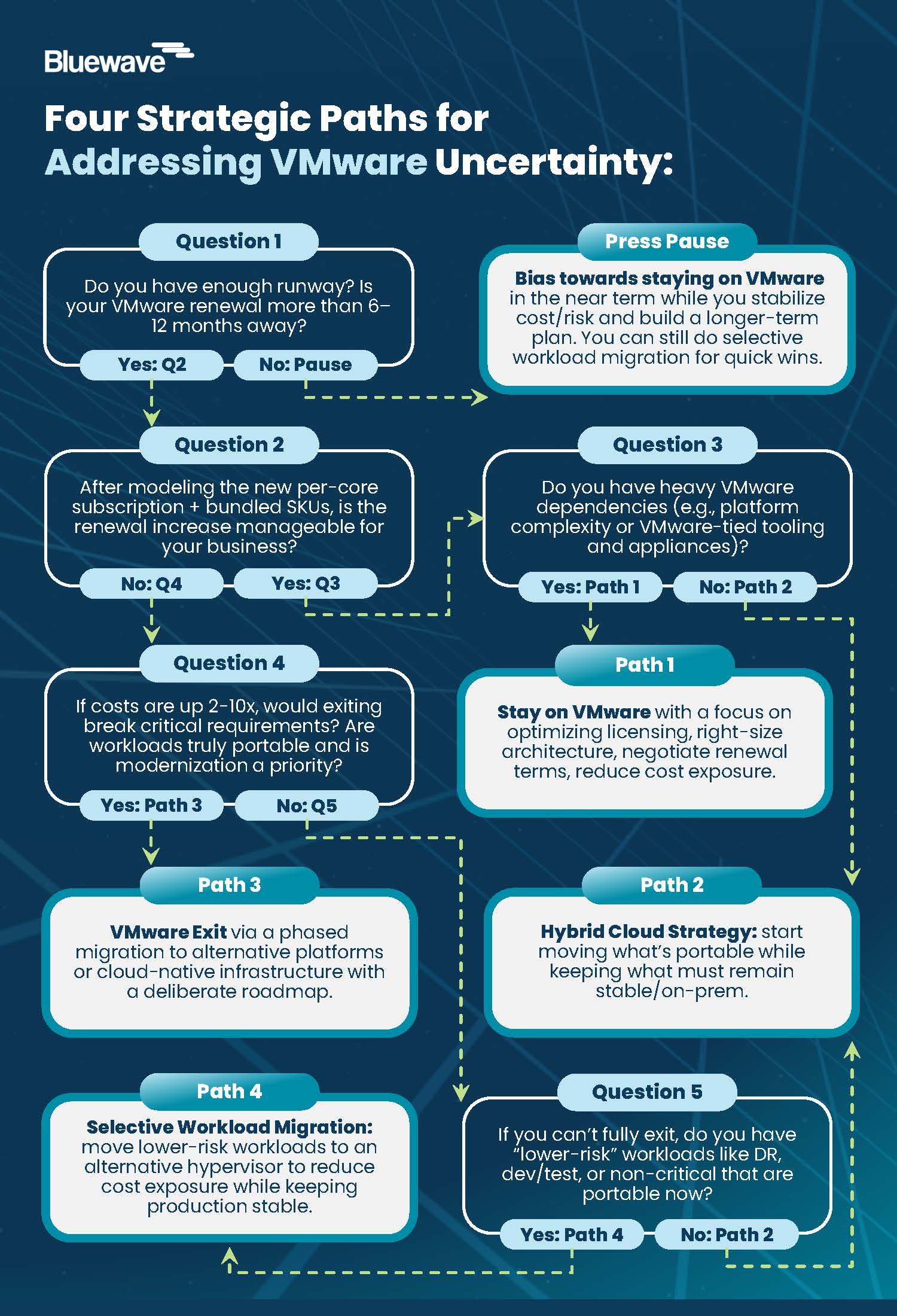
  • Every organization effectively faces four options: stay on VMware, go hybrid, migrate some workloads to another hypervisor or exit VMware entirely. The right answer depends on your actual environment.
  • A VMware Impact Assessment gives you an inventory of your workloads, a cost model under the new structure, a comparison of alternatives, and a realistic migration roadmap with risks and constraints.
  • Acting 6–12 months before renewal preserves leverage, expands options, and turns VMware disruption into an opportunity to modernize DR, cyber resilience, FinOps, and AI infrastructure.

Primary next step: Schedule your VMware Impact Assessment with Bluewave to understand your exposure and options before renewal dictates the outcome.


What Changed in the VMware Market?

The Broadcom acquisition of VMware has fundamentally reshaped the economics and structure of VMware licensing. These shifts center around:

Per-core subscriptions: Perpetual licenses are being replaced by mandatory subscription models billed per core, which can dramatically increase base costs in many environments.

Forced bundling: Standalone products have been absorbed into larger SKUs, so you are often paying for capabilities you do not need or use.

Partner ecosystem cuts: Broadcom has reduced the reseller and cloud service partner ecosystem, shrinking the pool of support and advisory options many customers relied on.

Pricing shock: Organizations continue to see big increases at renewal; some organizations are reporting 5x+ jumps.

Change  Impact 
Subscription-only Licensing No new perpetual licenses; ongoing costs rise
Essentials Plus Kit Retired Higher entry costs for small deployments
Per-Core Licensing (16-core min) Increases cost for low-core CPUs
Major Product EOLs vSphere 7.x, vSAN 7.x, and other require urgent upgrades
Centralized Downloads Secure, tokenized downloads; old URLs expired on April 24, 2025
Price Increases Substantial cost hikes for many organizations
Product SKU Consolidation Fewer choices, more bundled features
Terminated Legacy VMware Cloud Service Provider (VCSP) Agreements By moving to an exclusive, invite-only model focused on “VMware Cloud Foundation” (VCF), VMware shrunk purchasing paths for customers.


Navigating the VMware Uncertainty & Embracing Change

Too often, organizations focus on the cost increase related to the renewal rather than looking at this as an opportunity to re-envision their infrastructure strategy. To capitalize on this as a transformation play, we recommend you first assess the following:

  1. Gain visibility into the true cost to run under Broadcom’s new per-core, bundled model.
  2. Understanding what to move, when, and in what order without disrupting critical workloads.
  3. Identify competing priorities, as there may be an opportunity to solve multiple at once: Pressure to modernize cloud, DR, AI, and security at the same time as re-evaluating VMware.

Four VMware Strategic Paths: Stay on VMware, Go Hybrid, Migrate Select Workloads, or Full Migration

Every organization, regardless of size or industry, is effectively choosing between four paths when it comes to VMware.

Four VMware Strategic Paths

Path When It Fits Best Primary Focus
Stay on VMware Heavy VMware dependencies, near-term contractual obligations, limited appetite for major change Optimize licensing, right-size architecture, negotiate renewal terms, and reduce cost exposure
Hybrid cloud strategy Starting or accelerating a cloud journey; mix of regulated or latency-sensitive workloads and more portable apps Selective workload migration to public cloud while maintaining on-prem VMware where it makes sense
Selective workload migration Licensing costs are a concern, but a full exit isn’t feasible; DR, dev/test, or non-critical workloads are portable Shift lower-risk workloads to an alternative hypervisor to reduce cost exposure while keeping production stable
VMware exit Licensing costs are prohibitive; workloads are portable; modernization is a strategic priority Full migration to alternative platforms or cloud-native infrastructure, with a deliberate, phased roadmap

There is no one-size-fits-all answer. The right path depends on your environment, risk tolerance, compliance requirements, and modernization goals.


Diversifying the Hypervisor Strategy with Supported Alternatives

One strategic pathway that’s getting more attention lately is diversifying your hypervisor strategy. There have, rightly so, been a lot of concerns from organizations considering a switch to another hypervisor:

Security and Compliance

Security tooling currently running on VMware may not be compatible with a new hypervisor. Security tools that use VMware-native features, like vSphere-based VM encryption or guest introspections APIs will need to be revalidated and potentially replaced or reconfigured.

Compatibility

When migrating off VMware, organizations frequently discover that virtual appliances distributed as OVAs—security tools, network monitoring appliances, or third-party software delivered as pre-packaged VMs—can’t easily be dropped into platforms like Hyper-V, Nutanix AHV, or Proxmox without a manual conversion process that’s not guaranteed to work. On top of this, many vendors only officially support their appliances on specific hypervisors, putting you at risk of running an unsupported configuration.

Support

One underestimated risk when migrating to a new hypervisor is the organizational knowledge gap that opens when teams who have spent years mastering VMware’s ecosystem suddenly find themselves responsible for managing a different platform. VMware has a deep, mature ecosystem and that institutional knowledge doesn’t transfer, which means longer resolution times, more escalations to vendors, and a higher likelihood of misconfigurations that create security or availability risks.

Do These Concerns Mean You Should Avoid Migrating off VMWare?

We’d advise any organization considering migrating some or all workloads to a new hypervisor to keep these items in mind, but more than a year after the big VMWare changes were announced, the market has rapidly matured. Engineering teams now have many viable off-ramps without sacrificing enterprise support.

We are seeing clients successfully lab-test and deploy diverse stacks—from managed service providers offering turnkey Proxmox environments, to Platform9’s SaaS-managed KVM control planes, and Apache CloudStack for robust IaaS—proving you can regain control of your infrastructure without taking on the operational nightmare of open-source management.


Beyond VMware: Turning Disruption into Modernization

For many organizations, VMware disruption becomes the trigger for broader infrastructure modernization—an opportunity for an IT leader to reenvision their strategy.

We’ve seen this manifest in VMware strategizing becoming a catalyst for:

Data center exit: Rationalizing and consolidating infrastructure that no longer needs to be on-prem.

Disaster recovery modernization (DRaaS): Moving to modern DRaaS solutions with improved RTO/RPO and ransomware resilience.

Backup and cyber resilience: Implementing next-gen backup, immutable storage, zero-trust, and ransomware recovery architectures.

Cloud FinOps: Establishing ongoing cloud cost governance and optimization practices.

AI-ready infrastructure: Building GPU-ready compute and data pipelines to support emerging AI workloads.

How Bluewave Helps with a VMware Impact Assessment

A core element of how Bluewave works with clients is our Assess | Advise | Advocate framework. When it comes to VMware, we leverage this model to conduct a VMware Impact Assessment to help clients select the right strategic path for their business.

Through this Assessment, we cover five core components, including:

  1. Environment analysis: A clear inventory of your VMware environment, including VM counts, hosts, cluster configurations, and workload profiles.
  2. VMware cost comparison: Side-by-side cost modeling of your current spend versus renewal pricing under Broadcom’s new licensing structure.
  3. Alternative platform modeling: Comparable TCO analysis across two or more alternative platforms, on-prem and cloud, based on your workload profile.
  4. Migration roadmap: A phased migration plan with timelines, resource requirements, and risk mitigation strategies.
  5. Risk assessment: Identification of key risks, dependencies, and compliance considerations so you understand constraints upfront.

The outcome is a clear blueprint that eliminates guesswork and defines the business case for key stakeholders, such as finance.

Why You Need a VMware Strategy Now, Not Just at Renewal

The legacy VMware model is leaving. By 2027, most organizations will be forced into a new path one way or another.

The difference is straightforward:

  • Start early, and you control the outcome.
  • Wait, and the outcome is largely decided for you.

Teams that start 6–12 months before renewal have time to:

  • Understand true cost and risk
  • Evaluate realistic alternatives
  • Sequence migrations and mitigations
  • Preserve negotiation leverage

We’ve seen that teams who wait often underestimate migration timelines and dependency complexity, and whose organizations are then punished by higher costs.

Why Work with Bluewave as Your Infrastructure Advisor?

When the infrastructure market shifts this fast, it is easy to get pulled into vendor-driven decisions that may not fit your environment, timeline, or business goals. Bluewave helps you cut through the noise and move forward with clarity.

We work as an independent niche consultant, bringing objective guidance, practical insight, and active advocacy throughout the decision process. That includes helping you evaluate infrastructure options, model the financial impact of renewal versus change, build a migration path that reduces risk, and make sure disaster recovery stays aligned every step of the way.

Whether the right move is to stay, optimize, or migrate, our role is to help you make the decision with confidence and build a strategy that works for your business.

Let’s Start Now! Schedule Your VMware Impact Assessment

FAQs: VMware Renewals, Alternatives, and Assessments

  1. How much are VMware renewals really increasing?
    It is being reported that many VMware customers are seeing 2x–10x increases at renewal due to per-core subscriptions and bundled SKUs, with some reporting 5x+ jumps depending on configuration and features.
  2. When should we start evaluating our options before renewal?
    Typically, 6–12 months before renewal. That window gives you time to understand costs, explore alternatives, and build a migration or optimization plan before negotiation leverage disappears and timelines become compressed.
  3. Is staying on VMware still a viable strategy?
    For organizations with deep dependencies or near-term contractual obligations, staying and optimizing can be the right move, assuming you have clear cost modeling, defined optimization levers, and a view of future options.
  4. What does a hybrid VMware strategy look like in practice?
    In a hybrid approach, you move select workloads to public cloud, such as AWS or Azure, while maintaining on-prem VMware for regulated, latency-sensitive, or hard-to-move applications.
  5. What are some credible alternatives to VMware?
    On-prem alternatives include Nutanix, Azure Stack HCI, Red Hat OpenShift Virtualization, and Proxmox or Scale Computing, while public cloud exit paths include AWS and Microsoft Azure for lift-and-shift or cloud-native strategies.
  6. What exactly happens during a VMware Impact Assessment?
    Bluewave conducts environment analysis, cost comparison under the Broadcom model, alternative platform TCO modeling, a migration roadmap, and a risk assessment, then packages it into actionable recommendations you can share with stakeholders.

Agentic AI, Deepfakes, and Quantum Risk: The 2026 Cyber Playbook for CIOs & IT Leaders

The 2026 cybersecurity landscape is not just more hostile, it is structurally different.

Autonomous agentic AI, deepfakes, and an accelerating quantum threat are converging with geopolitical and regulatory pressure to redefine cyber risk for every enterprise.

For CIOs and IT leaders, this is more than a new wave of threats. It is a mandated 24- to 36-month IT roadmap reset.

This playbook translates the emerging AI‑native threat landscape into a working 2026 cyber guide for CIOs across four critical domains:

  • Identity proofing and access in a world of synthetic users and deepfake‑driven social engineering
  • Continuous Threat Exposure Management (CTEM) to replace periodic, point‑in‑time assessments
  • Post‑quantum cryptography (PQC) planning, including cryptographic inventory and crypto‑agility
  • Governance of AI agents and shadow AI, including non‑human identities and AI coding assistants

The goal: help you deliver defensibility, reduced operational risk, fewer high‑severity incidents, and clearer, board‑ready narratives on how your organization is preparing for the 2026 threat horizon.

Why 2026 Forces a Cyber Roadmap Reset

2026 marks the shift from an AI‑assisted to an AI‑native threat landscape. Autonomous AI agents can now orchestrate end‑to‑end attacks, from reconnaissance to exfiltration, at machine speed and at a scale no human team can match.

Deepfake‑driven fraud has moved from novelty to standard technique. Quantum‑motivated actors are already harvesting encrypted data today to decrypt later (“Harvest Now, Decrypt Later”).

At the same time:

  • Regulation is hardening, from the EU AI Act and National Post-Quantum Cryptography (PQC) roadmaps to expanded breach disclosure and privacy requirements.
  • Infrastructure risk is compounding, with Windows 10 end‑of‑life, exposed edge devices and IoT, and sprawling multi‑cloud architectures.
  • Cybercrime is industrialized, with no‑code malware, Ransomware‑as‑a‑Service (RaaS), and extortion‑only attacks run by well‑funded adversaries operating like SaaS companies.

In this context, incremental tuning of existing controls is no longer sufficient. CIOs need to treat the next 24–36 months as a distinct transformation window and use it to:

  • Re‑anchor cyber strategy around identity, exposure, cryptography, and AI governance
  • Rationalize and modernize infrastructure and vendor portfolios
  • Build defensible documentation and narratives that stand up to regulators, insurers, and boards

The rest of this playbook provides the blueprint.

TL;DR: The 2026 Cyber Playbook in 6 Bullets

  • Reset your cyber roadmap for 24–36 months, not 12: treat 2026–2029 as a distinct era defined by agentic AI, deepfakes, quantum urgency, and accelerated regulatory expectations.
  • Rebuild identity as the primary control plane, with stronger identity proofing, phishing‑resistant MFA, and governance for both human and non‑human identities (AI agents, service accounts, bots).
  • Stand up a Continuous Threat Exposure Management (CTEM) program to move from annual pen tests to real‑time visibility across applications, cloud, edge, and third parties.
  • Launch a formal Post-Quantum Cryptography (PQC) program now, starting with a cryptographic bill of materials (CBOM), long‑life data prioritization, and crypto‑agile architecture standards.
  • Govern AI agents and shadow AI as first‑class risk domains, with policies, registries, and controls that cover AI coding assistants, embedded AI in SaaS, and unsanctioned tools in business workflows.
  • Reset infrastructure and vendor strategy for an AI‑native era, aligning platforms, MSSPs, and contracts to support CTEM, PQC, Zero Trust, and AI governance objectives.

The 2026 Threat Horizon: From AI‑Assisted to AI‑Native Adversaries

Agentic AI and Machine‑Speed Attacks

Agentic AI systems go beyond content generation. They can:

  • Interpret goals (“maximize monetizable access in this sector”)
  • Plan multi‑step campaigns (from scanning and initial access to lateral movement and exfiltration)
  • Execute autonomously, adapting to defenses in real time

Recent operations have shown AI agents configured with preferred TTPs (through something as simple as a configuration file) and then unleashed across dozens of targets in parallel. Human attackers supervise and tweak at the meta‑level, but the kill chain is both highly automated and massively parallelized, compressing the kill chain to machine speed and executing it at a scale no human-lead team can match

You also need to assume “vibe hacking” and AI‑driven intrusions: agents that continuously learn your communication style, business rhythms, and approval patterns to blend malicious actions into everyday noise.

Implications for CIOs:

  • Attack volume and variance explode – traditional signature‑based defenses and static rules are now mesozoic.
  • Dwell time compresses from weeks to minutes – there is no room for human‑only detection and triage.
  • SOC operations must become AI‑assisted or AI‑autonomous to keep pace with machine‑speed campaigns.

Deepfake‑Driven Social Engineering and Synthetic Identities

Deepfake capabilities, voice, video, and text, have evolved to the point where Business Communication Compromise (BCC) is replacing classic email‑only BEC:

  • Executives’ voices and faces can be cloned from seconds of public content.
  • Real‑time deepfake video calls can be used to instruct staff to move funds or override controls.
  • Synthetic identities and synthetic users can pass weak identity verification checks at scale.

The result: you must assume any communication channel can be spoofed. Identity proofing, step‑up controls, and multi‑channel verification become mandatory for high‑risk workflows, especially in finance, HR, and IT.

Quantum Urgency and “Harvest Now, Decrypt Later”

While a cryptographically relevant quantum computer may still be years away, adversaries are already harvesting encrypted data today with the expectation they can decrypt it later (“Harvest Now, Decrypt Later (HNDL)”):

  • Long‑life data (e.g., health records, IP, strategic plans) stolen in 2026 may be decrypted in the 2030s.
  • Governments in the US, EU, UK, and Canada have set aggressive PQC transition timelines.
  • Enterprises will increasingly be asked to demonstrate how they are mitigating quantum risk.

This elevates Post‑Quantum Cryptography (PQC) from an R&D topic to a near‑term compliance and business continuity issue.

From Awareness to Action: A 24- to 36-Month Cyber Transformation Agenda

To respond effectively, CIOs should frame the next three budget cycles as a unified transformation program, anchored in five pillars:

  • Identity proofing and access – Make identity the resilient control plane for both humans and AI agents.
  • Continuous Threat Exposure Management (CTEM) – Establish continuous visibility into exploitable exposures, not just theoretical vulnerabilities.
  • PQC planning – Inventory cryptography, prioritize long‑life data, and build crypto‑agility into your architecture.
  • AI agent and shadow AI governance – Govern AI as you would any high‑risk, high‑privilege technology stack.
  • Infrastructure and vendor strategy reset – Align platforms, MSSPs, and contracts to support an AI‑native, quantum‑aware security model.

The following sections detail how to translate these pillars into a 24- to 36-month cybersecurity roadmap for 2026–2029.

Pillar 1: Identity Proofing & Access in a World of Synthetic Users

Redefining Digital Trust

Identity is now the primary perimeter, and it is under direct attack. The traditional IAM stack assumed users are humans presenting credentials, MFA factors (device, voice, biometrics) are difficult to fake at scale, and service accounts and bots are relatively static and centrally managed.

In 2026, none of these assumptions about the traditional IAM stack (passwords + MFA + periodic recertification) hold:

  • Synthetic users can be created and operated by AI agents.
  • Deepfakes can bypass voice‑based verification and even some biometric checks.
  • Non‑human identities (NHIs), APIs, service accounts, AI agents, now outnumber human users in many environments.

CIOs must re‑anchor digital trust on stronger proofing, context‑aware access, and lifecycle governance for all identities, human and non‑human. This is the practical expression of Zero Trust Architecture (ZTA) in a world of human and non‑human identities and should align with your broader Zero Trust and secure access solutions.

Strengthening Identity Proofing and High‑Risk Workflows

Over the next 24–36 months, focus on four moves.

Upgrade identity proofing for high‑risk roles and workflows

  • Move beyond simple KYC‑style checks to multi‑source identity verification (government IDs, authoritative registries, device reputation).
  • For critical financial and admin roles, consider in‑person or supervised remote proofing backed by strong documentation.

Adopt phishing‑resistant and deepfake‑resilient authentication

  • Standardize on FIDO2/WebAuthn or equivalent phishing‑resistant MFA for employees, contractors, and privileged users.
  • Eliminate SMS and voice‑based OTPs for sensitive operations; these are directly vulnerable to SIM‑swap, voice cloning, and vishing.
  • Introduce risk‑based step‑up (e.g., possession‑based factors plus secure device posture) for abnormal behavior or high‑value transactions.

Harden high‑risk approval workflows

  • Implement out‑of‑band verification for large transfers, vendor banking changes, and access escalations (e.g., approvals via a separate secure app, not email or chat).
  • Require dual control and multi‑person approvals where feasible, especially for irreversible transactions.
  • Embed verification scripts for staff: explicit steps they must follow if they receive urgent, high‑value requests via voice or video.

Instrument identity telemetry

  • Consolidate identity logs (IdP, PAM, VPN, SSO, endpoint) to detect anomalous patterns, impossible travel, and unusual device usage.
  • Feed identity telemetry into your CTEM, SOC, and Zero Trust pipelines to detect compromised or synthetic accounts quickly.

Governing Human and Non‑Human Identities (NHIs)

Non‑human identities, service accounts, APIs, AI agents, RPA bots, are now critical attack paths:

  • Create a unified identity inventory that includes NHIs with owners, purposes, privileges, and data access.
  • Apply least privilege and just‑in‑time access to NHIs; time‑bounded credentials and access tokens reduce blast radius.
  • Standardize on secrets management platforms for keys, tokens, and API credentials; eliminate hard‑coded keys and ad‑hoc storage.
  • Treat AI agents as full identities: they must be provisioned, monitored, and deprovisioned with the same rigor as human users, and registered in your AI model / agent registry.

This pillar should be tightly coupled with your broader Cybersecurity strategy and roadmap services and any Zero Trust initiative already underway.

Pillar 2: Continuous Threat Exposure Management (CTEM)

What CTEM Is and Why Periodic Assessments Are Failing

Continuous Threat Exposure Management (CTEM) is a programmatic approach to continuously:

  • Discover assets and attack surfaces
  • Identify and validate exploitable exposures
  • Prioritize remediation based on business risk
  • Measure and report improvements over time

Traditional approaches, annual pen tests, quarterly vulnerability scans, static risk registers, fail in an environment where:

  • New SaaS apps and cloud services are adopted weekly
  • AI‑driven attackers can discover and exploit new exposures in minutes
  • Edge devices and APIs expand the attack surface continuously

CTEM aligns security operations with the pace and style of modern attacks and should be treated as a core operating model, not a tooling purchase.

Periodic Security vs CTEM

Aspect Periodic Security Assessments Continuous Threat Exposure Management (CTEM)
Frequency Annual or quarterly Continuous or near‑real‑time
Scope Limited to known assets and scheduled tests Internet‑facing, cloud, edge, identities, third‑party integrations
Focus CVEs and configuration issues Validated, exploitable exposures tied to business impact
Detection of new exposures After next scan or pen test As assets and configurations change
Integration with change/release Often ad‑hoc, after deployment Embedded as a gating signal in change, release, and architecture
Board reporting Point‑in‑time, compliance‑oriented Trend‑based, focused on attack surface reduction and risk
Fit for AI‑native adversaries Poor – too slow and narrow Stronger – designed for fast‑moving, automated attack campaigns

Building a CTEM Program Across Apps, Cloud, and Edge

Over 24–36 months, CIOs should work with CISOs and security leaders to:

Define CTEM scope and ownership

  • Decide which domains are in scope initially: e.g., internet‑facing assets, high‑value applications, critical edge devices, third‑party integrations.
  • Establish a cross‑functional CTEM team (security, IT operations, cloud, app owners, risk) with a clear RACI.

Deploy or rationalize key capabilities

  • External Attack Surface Management (EASM): Discover internet‑exposed assets (domains, misconfigured services, forgotten instances).
  • Continuous vulnerability management: Integrate scanning with patch and configuration management; focus on exploitability, not just CVSS.
  • Breach and Attack Simulation (BAS) / automated validation: Continuously test controls (email, endpoints, identity, segmentation, backups).
  • Exposure analytics: Correlate exposures with business context (data sensitivity, criticality, regulatory impact).

Integrate CTEM with change and release processes

  • Make CTEM outputs blocking inputs into major releases, cloud deployments, and architectural changes.
  • Use exposure findings to prioritize technical debt remediation (e.g., unsupported OS, weak segmentation, unpatched edge devices).

Cover the edge and legacy estate

  • Explicitly map and monitor VPNs, firewalls, load balancers, OT gateways, IoT, and remote access appliances.
  • Where patching is constrained, use compensating controls (segmentation, strict access, virtual patching, additional monitoring).

This pillar should align with your cloud and edge modernization initiatives and tooling; for example, through Cloud and edge security modernization.

Metrics and Outcomes CIOs Can Take to the Board

CTEM provides board‑friendly, trajectory‑based metrics, such as:

  • Reduction in exploitable external attack surface over time
  • Time‑to‑remediate critical exposures (by category, by business unit)
  • Coverage of CTEM across environments (percentage of apps, cloud accounts, and critical assets under continuous validation)
  • Correlation with incidents: reduction in high‑severity incidents tied to known, unmanaged exposures

These metrics support regulatory defensibility: you can demonstrate not perfection, but reasonable, continuously improving diligence aligned to emerging threats and regulatory expectations.

Pillar 3: Post‑Quantum Cryptography (PQC) Planning

Understanding the Quantum Timeline and Regulatory Deadlines

Quantum computing progress and regulatory roadmaps converge on a simple conclusion: enterprises need to start PQC migration planning now.

Key realities:

  • HNDL attacks make today’s encrypted data tomorrow’s plaintext.
  • Government and sector regulators increasingly expect organizations to have a PQC plan, especially where long‑life data or critical infrastructure is involved.
  • Migration is multi‑year: cryptography is deeply embedded in protocols, applications, and third‑party dependencies.

For CIOs, the core risk question is: “Which data and systems must remain confidential beyond the plausible Q‑day?”

Building Your Cryptographic Bill of Materials (CBOM)

A Cryptographic Bill of Materials (CBOM) is foundational. Over 24–36 months:

Phase 1 – Discover and inventory

Identify where cryptography is used across:

  • Network protocols (TLS, VPNs)
  • Applications and APIs
  • Databases, storage, and backups
  • Hardware security modules (HSMs), smart cards, and embedded devices
  • Certificates and key management systems

Capture: algorithm, key length, library/vendor, key management model, renewal cycles.

Phase 2 – Classify by data longevity and criticality

Map cryptographic usage to data classes, focusing on:

  • Long‑life confidentiality needs (10+ years)
  • Regulatory requirements (health, finance, defense, privacy)
  • Business criticality and customer expectations
Phase 3 – Identify upgrade and dependency paths
  • Determine where PQC‑ready standards and implementations are available.
  • Flag hard dependencies and vendor‑controlled components (e.g., proprietary appliances, SaaS platforms).

This CBOM provides a prioritized PQC migration backlog that architecture, security, and vendor management can act on.

Embedding Crypto‑Agility into Architecture and Procurement

Beyond point migrations, CIOs should:

Mandate crypto‑agility in architecture standards

  • Design systems so cryptographic algorithms and parameters can be swapped without major rewrites.
  • Centralize key and certificate management to simplify algorithm changes.

Update procurement and vendor management

  • Require vendors to disclose cryptographic roadmaps, including PQC support and timelines, ideally aligned with NIST PQC algorithms such as ML‑KEM (Kyber), ML‑DSA (Dilithium), and SLH‑DSA (SPHINCS+).
  • Include clauses allowing you to enforce upgrades or terminate relationships if PQC timelines are not met.
  • For SaaS and managed services, ensure contractual commitments on PQC readiness, incident disclosure related to cryptographic failures, and transparency around data exposure (for HNDL considerations).

Plan for hybrid and migration patterns

  • Expect a period of hybrid cryptography (classical + PQC algorithms combined).
  • Align pilot projects with low‑risk but representative systems to build internal expertise.

Outcomes: a documented, defensible PQC strategy that meets regulator expectations and reduces long‑term confidentiality risk, without destabilizing current operations.

Pillar 4: Governance of AI Agents and Shadow AI

AI Agents as Non‑Human Identities

By 2026, autonomous agents and AI‑enhanced tools will be embedded across IT and business workflows:

  • AI coding assistants in the SDLC
  • AI copilots within productivity suites
  • Custom agents orchestrating companywide operations, data pipelines, or support workflows
  • Third‑party SaaS tools with opaque AI features

Each of these is effectively a non‑human identity (NHI) acting with some level of autonomy and access to data, systems, and credentials.

CIOs should drive a model where no AI agent operates without:

  • A defined owner and business justification
  • Documented permissions and data scopes
  • A technical control plane to manage tokens, access, and telemetry
  • Integration with IAM, logging, and incident response processes

This is the core of AI agent governance and should be reflected in your AI model / agent registry.

Controlling AI Coding Assistants and AI in the SDLC

AI coding assistants and generative tools materially change software risk: developers may accept insecure patterns suggested by models, models may embed vulnerable or non‑existent dependencies, and proprietary code may be leaked to external services through prompts.

A 24- to 36-month plan for addressing these risks should include:

Policy and guardrails

  • Define where and how AI coding tools may be used (e.g., allowed for boilerplate and test generation, restricted for cryptographic and auth code).
  • Require human review and secure coding checks on AI‑generated code, especially in sensitive components.

Tooling integration

  • Integrate AI usage with static and dynamic analysis, software composition analysis (SCA), and supply‑chain security tools.
  • Monitor for introduction of unknown or risky dependencies and configuration patterns that violate standards.

Education and patterns

  • Provide developers with approved prompts and patterns (e.g., “generate code that complies with OWASP ASVS Level 2 for authentication”).
  • Train teams on the limitations and risks of AI suggestions, including hallucination and context leakage.

Shadow AI: Discovery, Containment, and Enablement

“Shadow AI” refers to unsanctioned AI tools used by employees, often with good intentions to boost productivity:

  • Uploading customer or financial data to consumer LLMs
  • Connecting unvetted AI plugins to enterprise SaaS
  • Automating workflows via AI tools outside IT’s visibility

To address unsanctioned AI tools, follow a discover, contain, and enable safely approach:

Discover

  • Use network, CASB, DLP, and SaaS discovery tools to identify AI services in use.
  • Consider an AI use registration page or survey business units to surface legitimate use cases and pain points driving shadow AI.

Contain and govern

  • Define an AI acceptable use policy covering data types, services, and prohibited actions.
  • Implement data loss prevention (DLP) and egress controls to block sensitive data from leaving via high‑risk AI channels.

Enable safely

  • Offer sanctioned AI platforms (e.g., enterprise LLM endpoints, vetted copilots) with clear data handling guarantees.
  • Provide templates and blueprints for AI‑enabled workflows that meet security, privacy, and compliance requirements.

The objective is not to ban AI, but to channel it into governed, observable, and supportable patterns.

For help structuring policies and architecture patterns in this space, consider engaging Technology vendor selection and governance support to standardize evaluation criteria.

Infrastructure & Vendor Strategy Reset for 2026–2029

Securing Edge, Legacy, and Cloud‑Native Environments

Infrastructure risk is amplified by:

  • Edge device exploitation (VPNs, firewalls, gateways)
  • Legacy OS and platforms (including post‑EOL Windows 10)
  • Highly dynamic cloud‑native workloads and APIs
  • Pervasive IoT/OT devices running opaque, insecure embedded operating systems that are difficult to inventory, patch, and monitor

CIOs should:

  • Develop a time‑bound plan to exit unsupported platforms, backed by risk and cost analysis (including EOL OS and legacy middleware).
  • Treat edge devices as Tier‑0 assets: strict change control, rapid patch cycles, and enhanced monitoring.
  • Standardize on cloud security baselines (CSPM, CWPP, CIEM) and integrate them into CTEM.
  • Use network segmentation to isolate high‑risk or legacy environments and limit east‑west movement.

These actions should align with your broader Cloud and edge security modernization efforts.

Rethinking Vendor and MSSP Relationships in an AI‑Native Era

Your ability to deliver on this playbook depends heavily on your vendor ecosystem:

Move away from tool sprawl toward platforms that can:

  • Integrate identity, endpoint, network, and cloud telemetry
  • Support CTEM workflows and exposure analytics
  • Provide transparent AI usage and PQC roadmaps

Update contracts to include:

  • AI transparency: where and how AI is used in products and services; data usage, retention, and model training policies.
  • PQC commitments: timelines and support for standardized algorithms; support for crypto‑agility.
  • Incident and exposure obligations: SLAs for disclosure, remediation, and sharing of IOCs related to AI‑enabled attacks.

For MSSPs and MDR/XDR providers:

  • Ensure they can detect and respond to AI‑driven TTPs and deepfake‑enhanced fraud scenarios.
  • Clarify roles in CTEM, who owns continuous validation, who triages, who remediates.

This is a natural place to leverage Technology Advisory for strategy development and vendor evaluation, selection and execution.

Measuring Success: Risk Reduction, Resilience, and Regulatory Defensibility

CIOs should position program success around three outcome categories.

Operational Risk Reduction

  • Fewer high‑severity incidents, especially those rooted in identity compromise, exposed edge assets, and misconfigurations.
  • Reduced MTTD/MTTR for priority incident classes via AI‑augmented detection and response.

Resilience and Continuity

  • Ability to withstand and recover from AI‑enabled campaigns, including extortion‑only ransomware and data theft.
  • Proven backup, restore, and continuity capabilities validated through CTEM/BAS exercises.

Regulatory and Fiduciary Defensibility

  • Documented CTEM program, CBOM, PQC strategy, AI governance, and identity hardening roadmap.
  • Evidence of continuous improvement: trendlines showing shrinking exploitable attack surface and maturation of controls.
  • Clear, rehearsed board narratives that link initiatives to concrete risk reductions and compliance expectations.

These outcomes underpin conversations with regulators, insurers, customers, and investors and demonstrate that the organization is not caught flat‑footed by the 2026 threat horizon.

FAQs: Going Deeper in the 2026 Cyber Playbook

Q1. How is CTEM different from what our vulnerability management team already does?
A: Traditional vulnerability management focuses on finding and patching CVEs on a schedule. CTEM focuses on continuously discovering and validating exploitable exposures across assets, identities, configurations, and third parties, then prioritizing them based on business impact. It is programmatic and continuous, not episodic.

Q2. Do we really need to worry about quantum if practical attacks are years away?
A: Yes. If you hold data that must remain confidential for 7–10+ years or operate in regulated or critical sectors. HNDL means that adversaries stealing encrypted data today can decrypt it later. PQC migration is slow and intertwined with vendors, so you need a plan now even if Q‑day is not immediate.

Q3. What is the fastest way to reduce our exposure to deepfake‑driven fraud?
A: Start with high‑risk financial and access workflows: enforce dual control, out‑of‑band confirmations, and clear verification scripts. Move away from voice/SMS‑based approvals, and train staff to treat unexpected urgent requests, especially involving money or privilege changes, as suspicious by default.

Q4. How do we govern AI coding assistants without alienating developers?
A: Involve developers in designing practical guardrails. Provide approved enterprise AI tools, integrate them with existing DevSecOps pipelines, and clarify when AI is encouraged (tests, documentation) vs. restricted (crypto, authentication). Back policies with education and patterns, not just prohibitions.

Q5. What does a “defensible” cyber posture look like to regulators by 2026?
A: Regulators don’t expect zero incidents. They expect reasonable, risk‑based measures: a living risk register, programs like CTEM, documented PQC and AI governance strategies, evidence of board engagement, and transparent, timely incident handling.

Q6. Where should we start if budget is constrained?
A: Target high‑leverage controls: strengthen identity (phishing‑resistant MFA, privileged access), prioritize CTEM for internet‑facing and edge assets, and implement basic AI and data egress guardrails. Use early wins and improved metrics to build the case for further investment.

Q7. How do we align this playbook with Zero Trust initiatives we already have?
A: This playbook extends Zero Trust by: deepening identity confidence, providing continuous exposure validation (CTEM), and adding PQC and AI governance as new planks. You can position the program as Zero Trust 2.0, adapting the model to an AI‑native, quantum‑aware environment.

Next Steps: Turning the Playbook into a Program

To operationalize this playbook, Bluewave recommends:

  • Conduct a short, focused assessment of your current state across the four core pillars plus vendor strategy: Identity, CTEM, PQC, AI governance, and infrastructure/vendors.
  • Define a 24- to 36-month roadmap with clear ownership, milestones, and metrics tied to business outcomes.
  • Prioritize no‑regret moves in the next 6–12 months that give you visibility and quick risk reduction.
  • Engage a trusted advisory partner (Bluewave Technology Group!) to benchmark your posture against peers and best practices, and to help navigate vendor and architectural decisions.