AI Governance in the First 90 Days: Policies, Guardrails, and Ownership

What ‘Good’ AI Governance Looks Like in the First 90 Days

AI moved from experiments to everyday tools almost overnight. Your sales team has AI notes in their meeting app. Contact center leaders are piloting AI agents. Operations is testing copilots against internal documents.

The risk is that governance shows up late. When that happens, costs spiral, shadow AI grows, and security teams are left cleaning up behind tools they never approved.

The good news is that “good enough” AI governance doesn’t require a 200-page policy or a new committee for every decision. In the first 90 days, you can put lightweight policies, approval tollgates, AI guardrails, observability, ownership, and AI literacy in place that guide usage without killing momentum.

Here we outline what good early-stage AI governance looks like, taking advice discussed in our recent webinar and turning it into a 90-day framework you can use right away.

Good AI Governance TL;DR

  • Good AI governance does not require a heavy program on day one. In the first 90 days, organizations can put practical policies, approval checkpoints, AI guardrails, and ownership in place without slowing useful experimentation.
  • The first phase should focus on defining scope, standing up a lightweight working group, drafting a simple AI use policy, and creating a basic inventory of AI already in use.
  • The next phase should introduce clearer ownership, lightweight approval tollgates, better observability, and stronger alignment with existing security practices.
  • By days 61 to 90, the focus should shift to AI literacy, success metrics, and a first-pass governance playbook that can evolve over time.

ai-governance-90day-roadmap

Why AI Governance Can’t Wait for a Formal Program

In the cloud, relatively few people could provision infrastructure on their own. However, in AI, almost anyone can activate a new feature, buy a per-seat assistant, or launch a small application on a low-friction platform.

That creates three immediate problems:

  • Unowned spend, where finance and IT can see costs rising but can’t clearly tie them back to specific AI initiatives
  • Unclear risk, where data may be flowing into external tools without proper review
  • Unmanaged expectations, where business teams assume AI will work around weak processes or poor data

Waiting for a formal program only makes these issues harder to untangle. Good AI governance starts when experimentation starts. The goal in the first 90 days is to create enough structure, visibility, and AI guardrails for teams to move forward safely and intentionally, without hindering innovation. Check out this short clip from our webinar where we discussed AI governance.

What Is AI Governance?

AI governance is the operating model an organization uses to guide how AI is selected, approved, monitored, and improved over time. It defines who owns decisions, what rules apply to data and tools, how risk is reviewed, how success is measured, and how leadership maintains visibility as AI usage expands.

In practice, strong AI governance should answer questions like:

Which AI tools and features are approved today?

What data can and can’t be used with those tools?

Who reviews new AI use cases?

How are costs, outcomes, and risks tracked?

Which teams are accountable for policy, architecture, security, and business results?

AI governance is broader than a single policy document. It is the framework that helps organizations move from ad hoc AI usage to accountable, repeatable decision-making.

Principles of “Good” Early-Stage AI Governance and AI Guardrails

Before you design anything, align on a few principles.

  1. Start lightweight and evolve over time: You don’t need a mature governance structure on day one. A small working group, a short internal policy, and a basic approval checkpoint can reduce risk quickly while giving the organization room to learn.
  1. Make governance shared across the business: AI governance shouldn’t sit entirely with IT. Security, data, finance, procurement, and business leaders all have a role to play. Infrastructure teams may own platforms and technical risk, but business teams still own the outcomes AI is meant to improve.
  1. Prioritize visibility early: You can’t govern what you can’t see. Good AI governance starts with visibility into which tools are in use, which models and features are being accessed, what data those tools touch, and how spending is changing over time.
  1. Use AI guardrails to enable progress: The point of AI guardrails is to give employees a safe, consistent path to follow. That includes approved tools, data boundaries, review triggers, and clear ways to request new use cases. Guardrails should make adoption safer and more intentional.

With these principles in place, you can structure the first 90 days into three focused phases.

Days 0–30: Define Scope, Policy, and Early AI Guardrails

Clarify What AI Includes in Your Environment

Start by defining scope. In many organizations, AI may already include:

  • LLM chat tools, whether internal or external
  • AI features embedded in SaaS platforms
  • Internal copilots and agents built on enterprise data
  • Third-party AI services used by business teams or vendors

Write down what is in scope for your initial AI governance effort. This keeps the first phase focused and prevents the program from trying to solve everything at once.

Stand Up a Lightweight AI Working Group

You don’t need a large committee, but you do need a place where decisions land. Many organizations start with a cross-functional group that includes IT, security, data, finance, or procurement, and one or two major business functions.

In the first 90 days, that group’s charter should be simple: create initial AI policies and guardrails, review or fast-track early AI use cases, and track where AI is spreading and where risk is emerging.

A monthly or biweekly cadence is usually enough to begin.

Draft a Simple Internal AI Use Policy

Your first policy doesn’t need to be complex. It does need to be clear enough for managers and employees to act on. Focus on three areas:

  • Data rules, including what can be entered into external tools and what must remain internal
  • Tool rules, including which AI tools are approved and how new tools are requested
  • Behavior rules, including expectations for human review, accuracy checks, and disclosure in customer-facing work

A one-page policy is often enough to establish a baseline.

Create A Basic Inventory of AI Already in Use

In parallel, run a quick discovery effort across the business. Ask each business unit to list the tools, pilots, and features that already include AI, then work with major platform owners to identify which AI capabilities are enabled today. It is also a good idea to review contracts for references to AI, machine learning, or advanced analytics.

You will likely find more AI usage than expected. That is normal. The goal in the first 30 days is to create a map of what is happening today.

Days 31–60: Put AI Guardrails and Tollgates in Place and Add Ownership

With a foundation in place, the next 30 days are about shaping behavior.

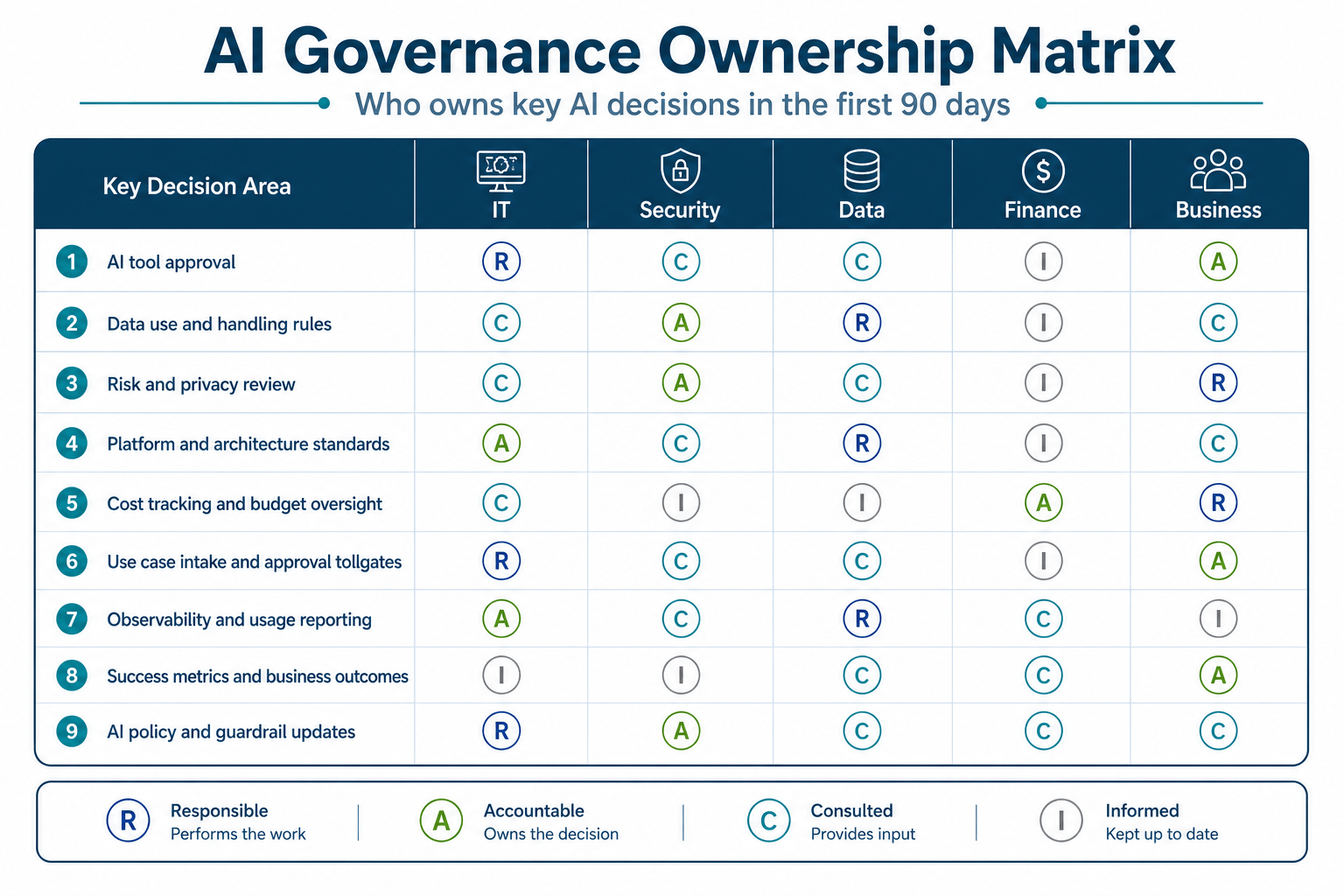
Define Ownership and Accountability

Clarify who owns what across a few core areas:

  • Risk, usually led by security, privacy, and legal
  • Platform and architecture, usually led by IT, data, and engineering
  • Cost, usually shared by finance and business leadership
  • Outcomes, owned by the business sponsor for each AI use case

A simple RACI goes a long way here. As AI adoption grows, some organizations also start considering more dedicated leadership roles, like a Chief AI Officer or Head of AI, to coordinate governance.
ai-governance-raci-matrixIntroduce a Simple Approval Tollgate

Not every experiment should take months to review. At the same time, every new AI use case should clear a basic checkpoint and comply with basic diligence.

Create a simple, one-page intake form that captures:

  • Business owner and sponsor
  • What problem the AI is trying to solve
  • Data sources involved
  • Tools, vendors, or models involved
  • Intended users
  • Success metrics and review timeframe

From there, use a basic triage path. Low-risk internal experiments can move quickly. Higher-risk or external-facing use cases can trigger deeper review. These “approval tollgates” act as practical AI guardrails that catch obvious issues before they spread.

Build Observability into AI Usage

In the webinar discussion, we emphasized that ‘observability is a core part of governance, not an afterthought’.

In days 31–60, you just need to aim for basic visibility into:

  • Which teams are using which AI tools and features
  • How often those tools are being used
  • Which models are involved in enterprise platforms
  • What token or license consumption looks like over time

Depending on the environment, this may come from native admin dashboards, centralized logging, or partner platforms with stronger telemetry. Even a rough baseline is better than none.

Integrate AI into Existing Security Practices

No need to build a separate AI security program. Extending your existing review processes is a better approach that will save both time and effort.

This may include adding AI-specific questions to vendor and privacy reviews, updating the risk register to reflect concerns such as misuse and data leakage, and asking security testing partners to assess AI-powered interfaces and public chat experiences.

This keeps AI governance aligned with the broader security rhythm of the organization.

Days 61–90: Scale Literacy, Measurement, and Ongoing Governance

In the final 30 days of this first phase, shift from reactive governance to proactive enablement.

Launch an AI Literacy and Change-Management Push

Governance works best when employees understand the “why” behind it. It also depends on how comfortable people feel using AI at all. In the webinar, we noted that many employees, especially early-career talent, see AI as a threat or feel tools are being forced on them.

Practical steps you can take:

  • Offer short trainings on safe, effective AI use in the tools you have approved
  • Share examples of where AI is already helping teams remove tedious work
  • Be explicit that AI is meant to augment people, not silently replace them
  • Provide a clear path for employees to ask questions or raise concerns

This builds trust and reduces the temptation to bypass guardrails.

Define Early Success Metrics & Criteria

Measurement is where governance and value meet. In days 61–90, start tracking:

  • Adoption: which teams and roles are using AI tools
  • Operational impact: time saved, error reductions, or throughput increases
  • Experience metrics: indicators like handle time, first-contact resolution, or deflection for CX use cases
  • Cost signals: licenses, token consumption, and incremental infra spend

Each pilot should also have a defined decision point where you explore options to either scale it, extend it with changes, or sunset it and document what was learned.

Formalize A First-Pass AI Governance Playbook

By the end of the first 90 days, most organizations have enough experience to document how AI governance works today. That initial playbook should clearly capture roles and responsibilities, core policies and standards, approval and review paths, and the reporting leadership uses to stay informed.

This first version does not need to be perfect or permanent. It simply needs to reflect reality clearly enough for the organization to build from it. Think of it as “version 1” of a playbook you will refine every quarter.

Plan the Roadmap Beyond 90 Days

The first 90 days are only the beginning.

Once the basics are in place, the roadmap should expand to include other areas that need deeper work, such as model risk management for high-stakes decisions, closer alignment between AI, data architecture, and cloud strategy, stronger security testing, and governance for more advanced agentic systems.

It helps to summarize these into a roadmap that shows leaders that governance is an ongoing process.

Common Pitfalls in Early AI Governance (and How to Avoid Them)

Even with the best intentions, organizations can stumble in a few predictable ways.

Over-engineering the framework too early: Spending months designing a perfect framework before you have real use cases wastes time and creates rules that don’t match reality. Anchor your policies in what people are actually doing with AI today.

Focusing only on tools, not on data and processes: If your underlying data is dirty or your process is broken, AI will amplify the problem, not fix it.  Make sure governance includes data quality and process ownership, not just tool approvals.

Ignoring employee sentiment: Forcing AI tools on reluctant teams or tying usage directly to performance can backfire and drive shadow AI instead of safe adoption. Treat literacy and change management as first-class parts of governance.

Treating governance as a “no” function: If every AI request turns into a lengthy blockade, people will route around the system. Use fast-track paths for low-risk experiments and focus on enabling safe patterns.

How Bluewave Helps Organizations Build AI Governance

You do not have to build this alone. Most IT and business leaders are already stretched thin managing cloud, security, and CX, even before AI enters the picture.

Bluewave’s role is to bring confidence and clarity to your technology decisions by:

  • Helping you define the AI outcomes that matter, then working backward to policies and guardrails that support them
  • Mapping your current state across cloud, SaaS, data, and contact center so you can see where AI is already in play and where the risks sit
  • Connecting you with proven partners who can operationalize observability, automation, and security in your AI stack

From there, we help you turn AI governance into a repeatable practice that keeps AI safe, accountable, and aligned to real business value.

If you are ready to get ahead of AI risk and cost without slowing your teams down, we are here to help!


AI Governance FAQs

Q: What are AI guardrails?

A: AI guardrails are the policies, technical controls, review checkpoints, and usage rules that help employees use AI safely and consistently. They define approved tools, data boundaries, escalation paths, and expectations for oversight. In practical terms, AI guardrails give teams a safe path to follow as adoption expands.

Q: How are AI guardrails different from AI governance?

A: AI guardrails are one part of AI governance. Guardrails are the specific rules and controls that shape day-to-day use. AI governance is the broader operating model that defines ownership, accountability, policy, risk review, observability, measurement, and leadership oversight. In simple terms, guardrails are the controls, while governance is the full system around them.

Q: What should an AI governance framework include?

A: A practical AI governance framework should include ownership definitions, AI use policies, data handling rules, approval workflows, observability, risk review processes, and success metrics. It should also define how the organization updates these practices as AI use becomes more advanced.

Q: Who should own AI governance?

A: AI governance is usually shared. IT, security, data, finance, procurement, legal, and business leaders all play a role. A cross-functional working group often works well in the early stages, especially during the first 90 days.

Q: How quickly should organizations put AI guardrails in place?

A: As early as possible. AI guardrails are most effective when they are introduced alongside experimentation, not after widespread adoption is already underway. Lightweight guardrails can be established quickly and refined over time as the organization learns.


 

Why AI Spend Is Harder to Track Than Cloud Spend

AI is quickly moving from pilots to production, but the bill that comes with it is hard to decipher. Finance leaders see cloud consumption climbing. IT leaders see more AI tools popping up in every corner of the business.

Yet the simple question, “What are we actually spending on AI?” is incredibly hard to answer with confidence.

Fragmented AI costs buried in SaaS add-ons, per-user subscriptions, token-based usage, and shadow deployments make it hard to govern risk, fund the right use cases, or prove ROI. The familiar cloud FinOps playbook suddenly breaks when everyone from marketing to contact center ops can swipe a credit card and turn on “AI.”

We took a look at AI and cloud spend in our recent webinar, where we discussed why AI spend is fundamentally harder to track than traditional cloud spend, and how IT, finance, and business leaders can rebuild shared visibility before costs spiral.

AI vs. Cloud Spend TL;DR

  • Cloud spend is usually easier to forecast because it lives inside a smaller set of providers with clearer tags, ownership, and optimization levers. AI spend is harder to track because it is scattered across SaaS add-ons, per-seat licenses, token-based APIs, data platforms, and shadow deployments.
  • AI costs are less predictable than cloud costs because they are driven by human behavior, such as prompts, retries, always-on agents, and uneven usage patterns, so two similar teams can generate very different bills.
  • The visibility problem is bigger than billing alone. AI often shows up as embedded features inside existing platforms, gets turned on by teams outside central IT, and may not have a single owner, budget line, or invoice that clearly says “AI.”

The answer is in extending FinOps for AI by defining what counts as AI spend, inventorying AI usage across the business, centralizing token and usage analytics, and putting lightweight governance around experimentation so costs can be tied back to value and ROI.

From Cloud FinOps to AI FinOps: Why the Rules Changed

Cloud management evolved over time; it wasn’t immediately “easy” to manage. Through experience, organizations developed FinOps practices that allowed them to predict spend.

For example:

  • Guardrails like reserved instances and committed use
  • Tagging standards for projects, environments, and business units
  • Policies to shut down idle resources and right-size overbuilt workloads

Even if cloud bills grew, there was a shared language between IT and finance. You could point to a specific cluster, region, or application and know which part of the business owned it and why.

The New Reality: Every Employee Can Turn on AI Features

Enter the AI pattern breaker. Your sales leader can toggle on an AI companion in your meeting platform. Your service team can enable an AI module in your contact center suite. Your engineers can ship AI agents to a new hosting platform in an afternoon. None of that requires a cloud architect or a ticket to central IT.

Instead of a small number of well-governed cloud accounts, you now have hundreds of small AI decisions made at the edge of the organization. Each one may be rational on its own, yet collectively they create a cost picture that no single team can see.

Why “Mary in Accounting” Is No Longer Enough

In the early days of cloud, the running joke was that only “Mary in accounting” knew the real cloud number, because every team picked a different provider. With AI, even Mary is blind.

AI spend shows up as:

  • Line items inside existing SaaS invoices
  • Per-seat subscriptions charged to corporate cards
  • Usage-based token bills from model providers
  • Extra infrastructure spend inside cloud and data platforms

There is no single “AI” invoice to reconcile, and no easy way to connect those costs back to specific use cases or business outcomes. Check out our webinar clip below where we discuss the conecpt of “Mary in Accounting.”:

Cloud vs AI Spend: Why Visibility Broke

Clear Tags and Reserved Instances Vs Opaque AI Line Items

In the cloud, capacity is the product. Providers want you to tag it and commit to it, because that makes forecasting easier on both sides. In AI, the product is often a feature: a button in a UI or a model behind an API.

That means:

  • You rarely see AI usage broken out with the same clarity as a virtual machine
  • Many SaaS vendors bundle AI features into “premium” tiers instead of itemized charges
  • It is harder to run classic FinOps playbooks like rightsizing or reservation planning

The cost exists, but it is obscured by the way it is packaged.

Cloud Workloads Live in A Few Hyperscalers; AI Shows Up Everywhere

Most organizations can list their main cloud providers on one hand. Whereas AI, by contrast, spreads across:

  • Collaboration tools that add AI transcription and summarization
  • Contact center platforms that offer AI agents and real-time assistance
  • IT and security tools that layer in AI-based analytics
  • Horizontal AI platforms for internal use cases
  • Niche apps where teams have already started “experimenting”

Each of these vendors prices AI in a slightly different way. Trying to roll that up into a single picture of AI spend is far more complex than aggregating a few cloud accounts.

Cloud Teams Own the Servers; Business Units Own the AI Outcomes

Cloud is still seen as infrastructure. AI is seen as an outcome: higher agent productivity, better customer experience, or faster analytics. That has two impacts on visibility:

Ownership splits: IT owns the platform, but line-of-business leaders sponsor the AI use cases and often hold the budget.

Cost classification confusion: A new AI module in a service platform might show up under “CX software,” even though it is functionally part of the AI program.

Without a common definition of “AI spend,” finance teams cannot see the full picture, and IT leaders struggle to connect costs back to value.

What Good AI Spend Visibility Looks Like

If AI spend is harder to track than cloud, what does “good” look like? Our webinar covered a few standout principles.

A clear, shared definition of “AI spend”: IT, finance, and business leaders need a common answer to a basic question: “What counts as AI spend here?

That definition should include:

  • Standalone AI platforms and agents
  • AI-infused features in SaaS apps
  • Data, integration, and infra that exist primarily to support AI workloads
  • External services related to AI strategy, implementation, and security

The goal here is to make sure these costs are visible and counted as part of the organization’s overall AI investment. That doesn’t mean every dollar needs to sit in one AI budget line; some spend can stay in categories like CX software, cloud, data, or services as long as it is still recognized as AI-related. Without that clarity, AI costs stay hidden, making total spend, ownership, and ROI harder to measure.

A central AI cost center that rolls everything up: You do not have to centralize all AI decision-making, but you do need a way to centralize AI cost reporting.

Many organizations are starting to do things like create a dedicated AI or “digital transformation” cost center, allocate AI-related SaaS add-ons and infrastructure to that cost center, and use chargebacks or showbacks to keep visibility at the business unit level.

The overall goal is simple: create one place where leaders can see AI’s total run-rate and how it breaks down.

Observability down to users, models, tokens, and prompts: To manage AI spend, you need telemetry.

That means tracking which users and teams are using which models, understanding token usage by application, use case, and business process, and being able to spot anomalies, such as sudden spikes or underused licenses

This kind of observability allows for more nuanced conversations. Giving you the ability to ask “Which use cases are driving cost, and are they delivering value?”

Governance that classifies features, platforms, and infrastructure

Governance is also a visibility tool. Lightweight AI governance should define categories like “embedded AI feature,” “enterprise AI platform,” and “AI infrastructure”.

It should also assign a default owner and budget home for each category, and lay out how new tools are evaluated, approved, and monitored over time.

When everyone understands how AI is classified, it becomes much easier to track where the money is going.

What Good AI Spend Visibility Looks Like

If AI spend is harder to track than cloud, what does “good” look like? Our webinar covered a few standout principles.

A clear, shared definition of “AI spend”: IT, finance, and business leaders need a common answer to a basic question: “What counts as AI spend here?

That definition should include:

  • Standalone AI platforms and agents
  • AI-infused features in SaaS apps
  • Data, integration, and infra that exist primarily to support AI workloads
  • External services related to AI strategy, implementation, and security

The goal here is to make sure these costs are visible and counted as part of the organization’s overall AI investment. That doesn’t mean every dollar needs to sit in one AI budget line; some spend can stay in categories like CX software, cloud, data, or services as long as it is still recognized as AI-related. Without that clarity, AI costs stay hidden, making total spend, ownership, and ROI harder to measure.

A central AI cost center that rolls everything up: You do not have to centralize all AI decision-making, but you do need a way to centralize AI cost reporting.

Many organizations are starting to do things like create a dedicated AI or “digital transformation” cost center, allocate AI-related SaaS add-ons and infrastructure to that cost center, and use chargebacks or showbacks to keep visibility at the business unit level.

The overall goal is simple: create one place where leaders can see AI’s total run-rate and how it breaks down.

Observability down to users, models, tokens, and prompts: To manage AI spend, you need telemetry.

That means tracking which users and teams are using which models, understanding token usage by application, use case, and business process, and being able to spot anomalies, such as sudden spikes or underused licenses

This kind of observability allows for more nuanced conversations. Giving you the ability to ask “Which use cases are driving cost, and are they delivering value?”

Governance that classifies features, platforms, and infrastructure

Governance is also a visibility tool. Lightweight AI governance should define categories like “embedded AI feature,” “enterprise AI platform,” and “AI infrastructure”.

It should also assign a default owner and budget home for each category, and lay out how new tools are evaluated, approved, and monitored over time.

When everyone understands how AI is classified, it becomes much easier to track where the money is going.

Practical Steps to Rebuild AI Cost Visibility

People tend to think along the lines of a massive transformation program to improve visibility. This is unnecessary.

Enterprises need to think in terms of pragmatic steps that build on each other.

Step 1 – Inventory AI Across the Organization

Start with: “Where are we already using AI?”

Actions to take:

  • Ask each business unit to list tools, pilots, and vendors that include AI
  • Work with procurement to pull contracts that mention AI, machine learning, or “advanced analytics”
  • Sit down with owners of major SaaS platforms (CRM, CCaaS, collaboration, ITSM) and identify which AI features are enabled

The outcome is a working catalog of AI capabilities, vendors, and teams. You will almost always discover more AI in use than leaders expected.

Step 2 – Extend FinOps Disciplines To AI

Next, bring AI into your existing cloud and FinOps practices.

That should include applying tagging or allocation concepts to AI services and add-ons and mapping AI costs back to products, projects, or value streams. You should also include AI usage and spend in regular FinOps reviews with finance.

The objective here is to treat AI as a first-class citizen in your financial operations.

Step 3 – Centralize Token and Usage Analytics

Wherever possible, consolidate AI usage through platforms that give you strong analytics. Then:

  • Track token consumption by model, user, and use case
  • Identify “noisy” use cases that create a lot of cost with limited value
  • Flag low-usage licenses or subscriptions that can be reclaimed or redeployed

Visibility at this level supports smarter design decisions, too. For example, you might adjust prompt patterns, model choices, or agent architectures to reduce unnecessary token burn.

Step 4 – Align SaaS AI add-ons with strategy

Once you can see AI features across your SaaS estate, you can make strategic choices, such as:

  • Where native, embedded AI is “good enough” and should be the default
  • Where specialized AI platforms deliver unique value that justifies extra spend
  • Which overlapping features can be consolidated to cut duplication

This step is less about policing vendors and more about designing an intentional AI experience for employees and customers.

Step 5 – Put lightweight governance around experimentation

Innovation does not have to stop when governance starts. In fact, governance can protect the freedom to experiment by keeping risk and spend within known bounds.

To do this, you can create a simple intake for new AI experiments that captures things like business owner and sponsor, target process or outcome, and expected timeframe and success metrics.

This intake can also capture:

  • Data sources, models, and vendors involved
  • A clear decision point to scale, pause, or stop

This helps avoid “forever pilots” that consume resources indefinitely without ever proving value or getting shut down. Click below for a short clip from our webinar discussion, where our group covered the mentality around these pilots and how to avoid some of the pitfalls.


Turning AI Visibility into Better Funding Decisions

Visibility into AI spend is a foundation for better funding conversations.

With clearer data, IT and business leaders can help fix broken workflows and move away from open-ended “AI experimentation budgets” toward specific, time-boxed initiatives. It also allows them to tie AI costs to measurable outcomes like reduced handle time, fewer manual steps, or higher customer satisfaction and it gives you the freedom to decide when to walk away early from AI projects that are “almost working” but unlikely to deliver acceptable ROI.

The most valuable AI projects are often the ones where you can point to both sides of the ledger: the investment you made and the capacity you freed up to focus on higher-value work.

How Bluewave and Our Partners Help You See the Whole Picture

Most organizations do not have spare cycles to untangle AI spend alone, especially while still trying to govern cloud, security, and CX. That is where an advisory-led approach can accelerate progress.

At Bluewave, we:

  • Help you define the AI outcomes that matter, rather than chasing tools
  • Map your current-state AI and cloud landscape, including hidden and embedded costs
  • Bring in proven providers where they are the right fit for your AI, cloud, and contact center strategy

Our goal is simple: give you confidence and clarity on where AI spend is going, how to keep it under control, and where it can drive the most value.

If you are looking at your AI bills and wondering where to start, our team can help!

AI vs. Cloud Spend FAQ

Q: How is AI spend different from traditional cloud spend?
A: Cloud spend is tied to infrastructure units like instances and storage inside a few providers, usually with clear tags and ownership. AI spend is fragmented across SaaS add-ons, per-user tools, token-based APIs, data platforms, and shadow deployments, often with no single owner or invoice.

Q: Why are AI costs harder to predict than cloud costs?
A: Cloud consumption can be forecasted from capacity plans and historical usage. AI costs depend heavily on human behavior (prompts, retries, agents running 24/7) and token consumption, so two similar projects or users can generate very different bills.

Q: Do we need separate FinOps practices for AI?
A: You do not need a separate discipline, but you do need to extend FinOps to cover AI: define what counts as AI spend, add AI to tagging/allocation schemes, and build visibility into tokens, models, and per-seat usage alongside your cloud dashboards.

Q: Who should “own” AI spend in the organization?
A: Infrastructure teams typically own cloud bills, but AI spend is shared across IT, finance, and business units. Many organizations are creating a central AI or digital transformation cost center, then allocating spend back to units based on usage and outcomes.

Q: How can we stop AI costs from spiraling while still experimenting?
A: Shift from open-ended experimentation budgets to small, time-boxed initiatives with clear owners, metrics, and exit criteria (workshop → proof of concept → pilot). Be willing to walk away when value is not proven, and use lightweight governance to keep experiments inside known risk and spend limits

AI Cloud Cost Management: Where AI Spend Starts Creeping Up

The Problem With “Cheap” AI Pilots

According to a recent commissioned study by Forrester, 72% of globally surveyed companies report exceeding their cloud budgets. AI pilots often look simple and affordable: a copilot add-on here, a proof-of-concept there, and a vendor demo that fits neatly into this year’s budget.

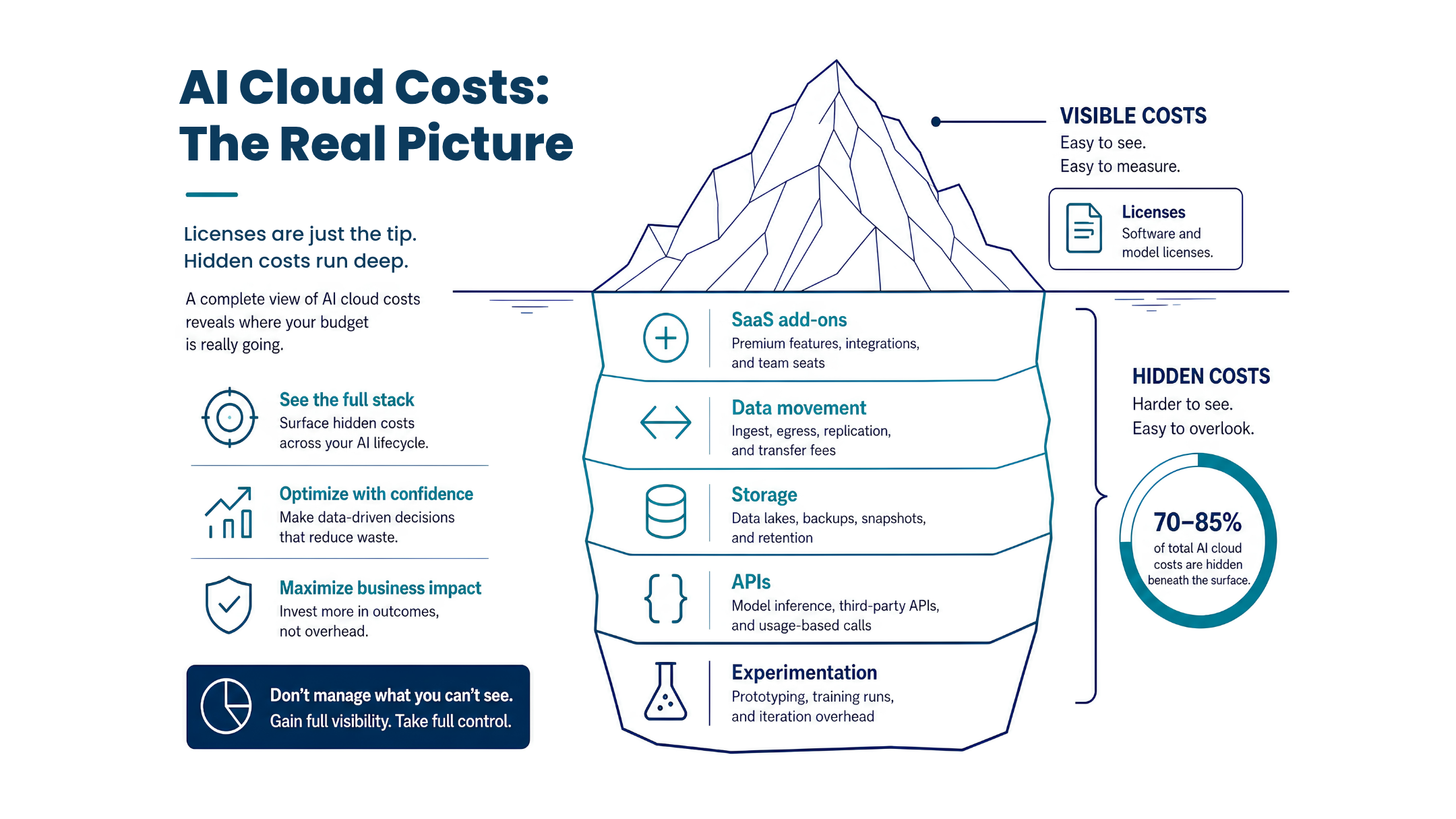
Then the quiet charges begin to land. SaaS tools roll out AI surcharges across dozens or hundreds of users. Data starts moving between clouds in ways it never did before. Storage grows as teams keep “temporary” logs, embeddings, and sandboxes. API consumption shifts cost from fixed licenses to variable bills that spike when pilots get popular. Meanwhile, experiments that never reach production still consume tools, environments, and staff time.

Individually, each line item seems reasonable. Together, they turn into AI cost creep that is hard to explain to a CIO or CFO. With Gartner forecasting worldwide GenAI spend to grow by more than 75%, the challenge of managing AI spend is intensifying.

Here, we walk you through where these hard-to-find budget lines show up and what IT leaders can do to keep AI spend under control once the pilot succeeds.

AI Cloud Cost Management TL;DR

  • Cloud spend is already strained, and poor AI planning amplifies it. Most teams are overshooting cloud budgets, and GenAI growth makes cost creep more likely without new controls.
  • AI pilots look cheap; real costs show up later. Once pilots spread, spend appears in SaaS AI add-ons, data movement and egress, storage growth, usage-based APIs, and experiments that never reach production.
  • AI adoption creates a chain of hidden costs across your stack. Licenses are only one link; connectors, storage, network, security, and operations all add up, often across different budgets, so no one sees the whole picture.
  • Main cost leak points are manageable with targeted fixes. Use role-based SaaS enablement and contract reviews, bring models to the data, apply storage lifecycle and tiering, set API budgets and prompt tuning, and govern experimentation with clear stages and cost centers.
  • AI-specific cost models and readiness checks de-risk scaling. Map AI costs across cloud, apps, and people; tag resources; track cost per outcome; and build a simple dashboard and alerts before you scale. If that picture is fuzzy, it is a good time to pull in a partner like us.

The AI Adoption Cost Chain

Most AI business cases center on the obvious purchase: a model subscription, a platform license, or an AI feature inside an existing tool. That is only the first link in a chain.

Once teams begin using AI, supporting systems expand around it:

  • New connectors and integrations to move data into and out of AI tools
  • Extra storage for prompts, logs, embeddings, and outputs
  • Network traffic between clouds and regions
  • Additional security, governance, and monitoring layers

Finance sees the license. IT feels the rest: compute, storage, data engineering, and operational overhead spread across multiple budgets. This split ownership is one reason AI value can be hard to measure and defend. Different leaders see different parts of the cost stack.

If you treat AI as a single line on a spreadsheet, you miss where the real budget pressure begins.

AI Cloud Costs infographic

Saas Add-Ons: The First AI Budget Surprise

AI features in SaaS platforms are increasingly sold as premium add-ons, often priced per user or per environment. On their own, these uplifts can feel modest. The risk lies in how quickly they multiply.

How Saas AI Features Drive Cost Creep

Common patterns that drive AI cost creep in this area are broad enablement without a plan, layered surcharges across the stack, and overlapping capabilities.

To regain control, organizations need to

  • Start with a role-based adoption plan: Decide which job functions actually need embedded AI features. Limit early access to those roles, measure impact, then expand.
  • Consolidate where you can: Pick primary systems of record (for sales, service, collaboration) and steer most embedded AI use there instead of everywhere.
  • Review contracts through an AI lens: At renewal, ask vendors for clear reporting on AI usage and outcomes. Use this to negotiate pricing and reduce overlapping capabilities.

Data Movement: The Invisible Cost Of “AI Everywhere”

As AI use cases grow, they pull on data that was never designed to move this frequently or this broadly. The result is a quiet rise in integration and network spend. These costs tend to show up with connectors and integration platforms, cloud egress and inter-region traffic, and data replication and synchronization.

The more real-time the use case, the more frequent and expensive the movement becomes.

Organizations can reduce data-movement spend by

  • Bringing models to the data where possible: Favor architectures that keep data in your primary cloud or warehouse and call models there instead of copying data into separate AI platforms.
  • Standardizing data access patterns: Create shared integration patterns and APIs for AI use cases instead of one-off connectors for every team.
  • Making egress and integration a line in every AI business case: Force each use case owner to account for data movement, not just model costs.

Storage Demand, It Grows Faster Than You Expect

Even if your AI model is external, your data footprint is local. AI programs create more of almost everything: prompts, logs, embeddings, vector indexes, model outputs, and retained conversation histories.

AI quietly inflates storage through “temporary” sandboxes that never get cleaned, excessive retention (keeping logs, traces, and interaction histories “just in case” they are needed for future tuning or audits), and default high-performance tiers that are never tiered down as the AI data ages.

Some “storage-aware” best practices for AI:

  • Define retention and lifecycle policies for AI data: Treat prompts, embeddings, and logs like any other regulated data class. Decide how long you need them and where they live over time.
  • Tag and auto-expire sandboxes: Require every experimental environment to carry an owner, a cost center, and an expiry date. Review and shut down unused assets on a schedule.
  • Right-size performance tiers: Move infrequently accessed AI data to lower-cost storage as soon as practical.

API Consumption: From Fixed Cost to Moving Target

API-driven AI shifts spend from fixed licenses to usage-based billing. That flexibility is powerful, but it behaves very differently from traditional software budgeting. What makes API cost forecasting hard is that small changes have large impacts. Things like prompt volume, context length and response size, automation frequency, and downstream chaining all have effects that add up fast.

API-Driven AI Guardrails:

  • Set usage budgets per use case: Define monthly token or API-call budgets linked to business value (for example, cost per ticket resolved).
  • Instrument early and often: Build basic usage dashboards into every AI service from day one, not just after invoices surprise you.
  • Tune prompts for efficiency: Trim unnecessary context, reduce response verbosity, and consider smaller or specialized models where they are “good enough.”

Experimentation: Spend Arrives Long Before Value

Most organizations try experimenting with AI across multiple teams before they have a clear production operating model. The issue here is that sandbox work still consumes budget spend.

This is because pilots and PoCs require teams to stand up their own notebooks, sandboxes, and small clusters; need data prep and engineering time; and often entail more internal labor and opportunity cost than anticipated.

Some pilots never move beyond demo stage, but their supporting infrastructure and data linger as ongoing spend.

To combat this, you need to make experimentation a managed investment:

  • Define stages, gates, and owners: Require each experiment to have a sponsor, success criteria, and a timebox. If it does not clear the bar to continue, shut it down and recycle what you can.
  • Separate experimental and production environments: Give pilots their own cost centers so you can see how much is being spent on learning vs scaled value.
  • Re-use assets from failed experiments: Standardize prompts, connectors, and components so they can be re-used, even if the original pilot does not ship.

How To Spot AI Cost Creep Before It Hits Your Budget

To regain control, IT leaders need an AI-specific cost model that reflects how work really happens: across data, compute, applications, and people.

Mapping AI Costs Across Your Stack
Cloud & Infrastructure Compute for training vs inference (including GPU/CPU, serverless, and managed AI services)
Storage and backup costs tied to AI datasets, logs, and embeddings
Network and egress fees associated with AI traffic patterns
Application & Integration Orchestration platforms, MLOps tools, and observability services supporting AI workloads
Connectors and integration projects that exist primarily for AI use cases
Customizations in CRMs, ERPs, and line-of-business apps to embed AI into workflows
People, Process, & Vendor Management Internal enablement and “citizen developer” programs
Advisory and implementation partners
Ongoing support, governance, and security efforts tied specifically to AI adoption

Tag AI-related resources, set up chargeback or showback, and link usage to teams and products so leaders can see who is driving which part of the cost stack.

Once you have a basic map, you can start distinguishing healthy growth from wasteful spend.

Focus on these metrics, they will let you have a real conversation with finance about where AI spend is earning its keep:

  • Cost per use case: For example, cost per AI-assisted ticket resolved or per AI-generated proposal.
  • Cost per workflow or transaction: Compare AI-assisted vs non-AI workflows wherever possible.
  • Cost per successful outcome: Tied to business metrics like leads qualified, sales cycle reduced, or mean time to resolution.

To get started, you will need to aim for a simple dashboard that brings together SaaS AI add-on spend, cloud AI services, API usage, and storage tied to AI work, budget alerts and thresholds that trigger review before costs spike, and executive-level summaries that show value and spend in the same view.

AI Cost Control Framework infographic

A Practical Checklist Before You Scale AI

Before you expand AI adoption beyond successful pilots, ask these questions:

Where have AI features already been enabled inside existing SaaS tools?

Which data sources, connectors, and storage tiers does each use case depend on?

How much of your current AI spend is experimental vs production?

What guardrails exist for API usage and token consumption?

Do you have at least a basic AI cost model that includes adjacent infrastructure and operational spend?

Organizations that treat AI as an ecosystem cost, not just a software purchase, are better positioned to control spend, prioritize the right use cases, and build a defensible ROI story.

How Bluewave Can Help with AI Cloud Cost Management

If you are seeing AI spend spread across SaaS, cloud, storage, and experimentation, you do not have to untangle it alone. We help IT and business leaders see the full picture of AI costs and design a path forward that balances innovation with financial control.

We start by looking at your environment and assessing things like where AI features are already enabled, how data moves between systems, which storage tiers AI workloads rely on, and how much of your current spend is tied to experimentation versus production value.

From there, we work with you to:

  • Build a simple, actionable AI cost model
  • Establish practical guardrails for API usage, pilots, and sandboxes
  • Identify consolidation opportunities across tools and vendors

Our goal is to give you the visibility, controls, and architecture you need so that every new AI use case strengthens your business case instead of increasing your run-rate.

Ready to see where AI spend is hiding in your environment? Check out our webinar!

FAQ: AI Cloud Cost Management

Q: Why do our AI pilots look cheap but get expensive later?

A: Pilots are small and tightly scoped, so costs stay low. When you scale them, SaaS add-ons, data movement, storage, and API calls all grow, and old experiments keep costing you in the background.

Q: Where are the “stealth” AI costs most likely hiding?

A: Most often in premium AI features quietly turned on in SaaS tools, higher integration and egress fees as data moves more, and growing storage from logs, embeddings, and sandboxes that never get cleaned up.

Q: How can we keep data-movement and storage costs in check?

A: Bring models to your data when you can, use shared integration patterns, and include egress in each use case’s budget. Set retention rules, auto-expire sandboxes, and move older AI data to cheaper storage tiers.

Q: How do we stop API usage and experimentation from becoming an open tab?

A: Give each use case an API budget, track usage from day one, and tune prompts so they are efficient. For experimentation, use clear stages and timeboxes, keep pilot and production spend separate, and re-use assets from pilots whether they ship or not.

Q: How do we know if our AI spend is healthy or turning into cost creep?

A: Build a simple AI cost model, then track cost per use case, workflow, and successful outcome. A basic dashboard that combines SaaS AI add-ons, cloud AI services, API usage, and storage will quickly show what is driving value vs waste.

Signs Your Cloud Environment Has Outgrown Your Cloud Management Strategy

A Self-Assessment for IT and Business Leaders

Cloud environments rarely become unmanageable overnight. More often, cloud cracks grow gradually and in ways that are easy to rationalize. Until costs spike or security gaps emerge, IT teams may not realize their original cloud management processes can no longer keep up.

With over 90% of companies worldwide using cloud services, these cracks cannot be ignored.

What starts as a manageable cloud footprint can quickly evolve into a sprawling, complex ecosystem of workloads, subscriptions, users, licenses, and resources. When that happens, informal or reactive management approaches often break down.

The challenge, for most organizations, is recognizing when your cloud environment has outgrown the management framework you originally put in place.

We developed this guided self-assessment after helping hundreds of organizations optimize and govern their cloud environments. With it, IT and business leaders can proactively identify the warning signs before these issues become larger operational or financial problems.

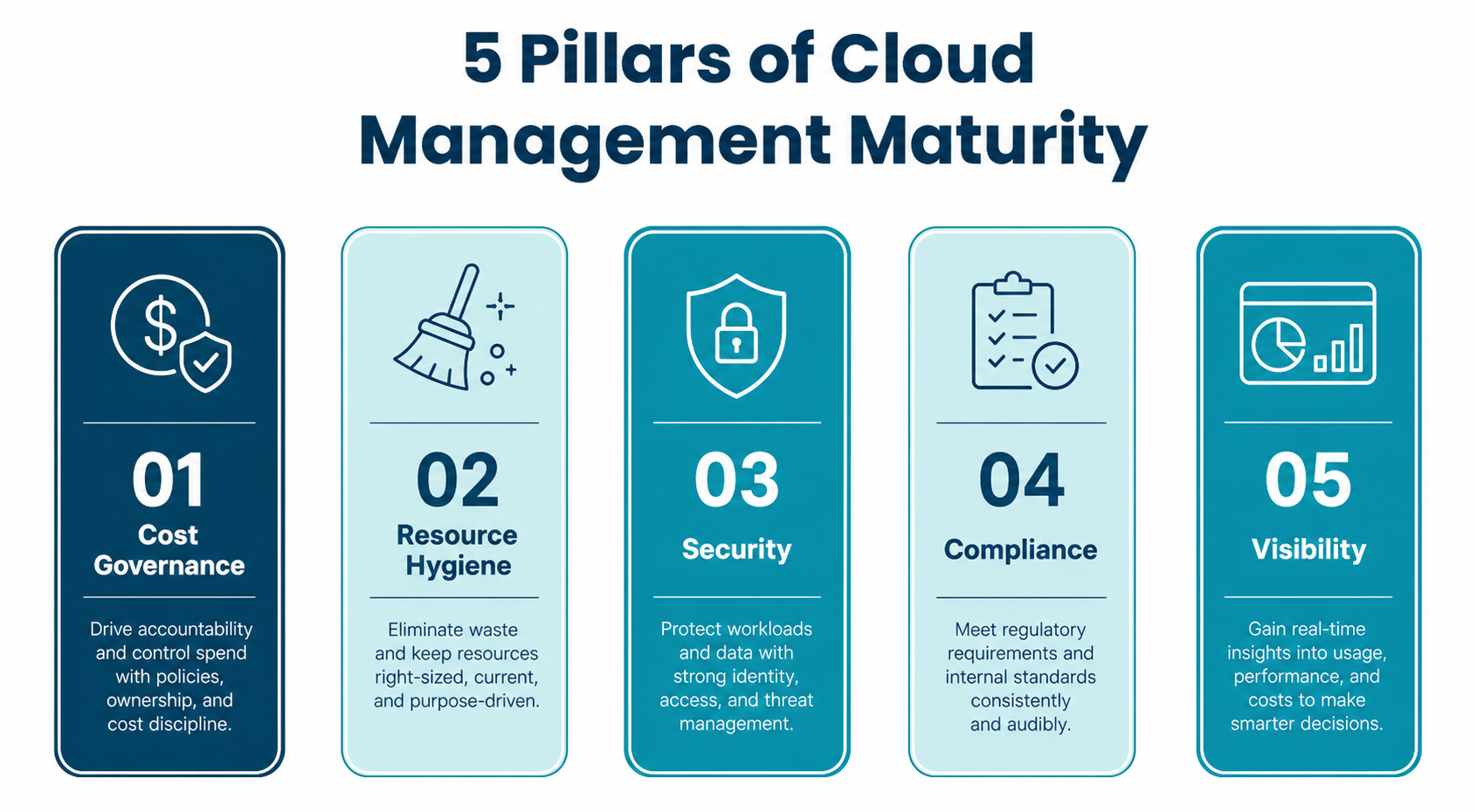
Cloud Management Pillars Infographic

Use the self-assessment below to evaluate your cloud management maturity across five critical areas:

  1. Cost Governance
  2. Resource Hygiene
  3. Security Posture
  4. Identity & Compliance
  5. Operational Visibility

If you answer “yes” to multiple questions in any category, your environment may be signaling that it’s time to modernize your cloud management strategy.

The Five Pillars of Cloud Management Maturity

1. Cost Governance

The Sign: Your cloud bill is unpredictable, consistently exceeds budget, or cannot be tied to business outcomes.

One of the earliest signs your cloud environment has outgrown your management approach is when spending becomes reactive instead of strategic. Organizations struggling with cloud cost management often face inaccurate forecasting, budget overruns, and limited accountability for spending decisions.

Ask Yourself:

  • Do your monthly cloud costs consistently exceed budget by 20%, 50%, or more?
  • Are you unable to forecast next month’s cloud spend with reasonable accuracy?
  • Do you lack budget alerts or threshold notifications in your cloud console?
  • Is there no formal tagging strategy to allocate costs by team, department, or initiative?
  • Are you purchasing reservations or savings plans before fully rightsizing workloads?
  • Is no one clearly accountable for cloud cost overruns?

What This Looks Like in Practice

Organizations with weak cost governance often experience cloud spend exceeding approved budgets by 300% or more without automated alerts or oversight mechanisms in place.

Cloud cost management tools may exist, but they’re rarely reviewed consistently, and budgets are often set once and forgotten.

Why It Matters: Poor cloud cost governance impacts more than IT budgets. It reduces profitability, limits reinvestment opportunities, and weakens leadership’s confidence in forecasting.

2. Resource Hygiene

The Sign: You’re paying for infrastructure you’re not using and lack a process to identify or remove waste.

Unused, idle, or overprovisioned resources are among the clearest indicators that a cloud environment has scaled beyond manual management. Without proactive cloud optimization practices, what once required manual review now generates ongoing, silent waste.

Ask Yourself:

  • Do you have virtual machines in a “deallocated” or powered-off state that are still incurring storage charges?
  • Are unattached managed disks or orphaned snapshots sitting unused for 30+ days?
  • Has your team not completed a rightsizing review in the past 12 months?
  • Do 20–30% or more of your VMs show sustained low CPU and memory utilization?
  • Are inactive/disabled employees still assigned paid SaaS licenses like Microsoft 365?
  • Do users hold overlapping or redundant software license tiers?

What This Looks Like in Practice

Many unmanaged environments carry dozens of idle VMs, hundreds of orphaned storage assets, and inactive user licenses for months, even years, after offboarding. These aren’t isolated issues; they’re systemic indicators that resource lifecycle management is no longer operationalized.

The Opportunity: Organizations that improve cloud resource hygiene can often uncover $5,000–$12,000+ in monthly savings simply by removing idle infrastructure, rationalizing licenses, and decommissioning orphaned resources. Our Cloud Optimization Assessment helps identify and capture these savings.

3. Security Posture

The Sign: Your cloud infrastructure has public-facing exposures your team may not fully understand or actively monitor.

Security risks in cloud environments tend to accumulate gradually through misconfigurations, deferred remediation, and missing governance controls. When cloud environments outgrow their management strategy, those vulnerabilities often become systemic.

Ask Yourself:

  • Are any databases or critical services configured with public network access?
  • Do network security groups allow RDP or SSH access from any IP address?
  • Do storage accounts or blob containers permit anonymous access?
  • Have Key Vaults or secrets repositories been deployed without purge protection?
  • Are core business applications running on outdated or unsupported code?
  • Is there a gap between your written security policy and enforced cloud controls?

What This Looks Like in Practice

In environments operating without governance guardrails, we tend to see things like public-facing SQL servers accessible from the internet, overly permissive firewall/security rules, anonymous storage access bypassing authentication, and secret management tools without deletion protection. These are patterns, not exceptions.

Why It Matters: These conditions significantly increase exposure to ransomware, data breaches, compliance violations, and reputational damage.

4. Identity & Compliance

The Sign: Privileged access is loosely managed, and compliance depends more on assumptions than verification.

As cloud environments scale, identity governance is often one of the first management disciplines to break down. Without automation and oversight, privileged accounts accumulate, password policies weaken, and compliance gaps remain hidden until audit time, or worse, until a breach occurs.

Ask Yourself:

  • Do service or admin accounts have passwords older than 90 days?
  • Are privileged accounts regularly monitored and audited?
  • Is MFA enforced for all administrative access?
  • Does every privileged account have documented ownership?
  • Are elevated-permission accounts still active without business justification?
  • Can you produce an accurate access inventory across cloud and SaaS systems?

What This Looks Like in Practice

In poorly governed environments, password ages may extend into the thousands of days, admin accounts remain active long after ownership changes, MFA is optional rather than enforced, and privileged access grows without lifecycle management.

Why It Matters: The environment may appear compliant on paper, but in practice, it remains vulnerable and legally exposed.

5. Operational Visibility & Governance

The Sign: Your team is constantly reacting to issues instead of proactively managing the environment.

Strong cloud governance is not one tool or one policy. It’s an operational framework.

When governance is absent or inconsistent, cloud complexity compounds quickly.

Ask Yourself:

  • Is your cloud architecture documented and up to date?
  • Do you have a formal tagging/ownership governance framework?
  • Are route tables, subnets, and network configs reviewed regularly?
  • Is there a strategic cloud roadmap aligned with business goals?
  • Are legacy workloads operating without modernization plans?
  • Does your team struggle with siloed systems or fragmented data?
  • Are repetitive manual tasks still unevaluated for automation?
  • Are you prepared to support AI/analytics initiatives with your current infrastructure?

What This Looks Like in Practice

Configuration drift (where deployed infrastructure no longer matches documented or intended design) is one of the most common and costly signs of governance breakdown. Unused subnets, orphaned route tables, and unowned resources accumulate quietly.

Why It Matters: Without operational visibility, waste and risk reappear quickly, even after cleanup efforts.

How to Interpret Your Results

Use your answers to gauge your current cloud management maturity:

0–5 Yes Answers: Your cloud management strategy is likely functioning well, though ongoing reviews are still recommended.

6–10 Yes Answers: Some areas may require optimization before inefficiencies and risks escalate.

11+ Yes Answers: Your cloud environment has likely outgrown its current management approach and may require a more modern cloud governance framework.

What a Modern Cloud Management Strategy Looks Like

A mature cloud management approach should provide:

  • Continuous Cost Monitoring: Real-time insight into spend, forecasting, and budget accountability.
  • Automated Governance Policies: Controls that prevent drift, enforce standards, and reduce human error.
  • Security & Compliance Monitoring: Proactive oversight to identify and remediate risk before incidents occur.
  • Rightsizing & Optimization Reviews: Regular workload assessments to eliminate waste and improve performance.
  • Strategic Roadmapping: A long-term cloud strategy aligned with evolving business priorities.

If these practices are absent or handled informally, your organization may already be experiencing management breakdown.

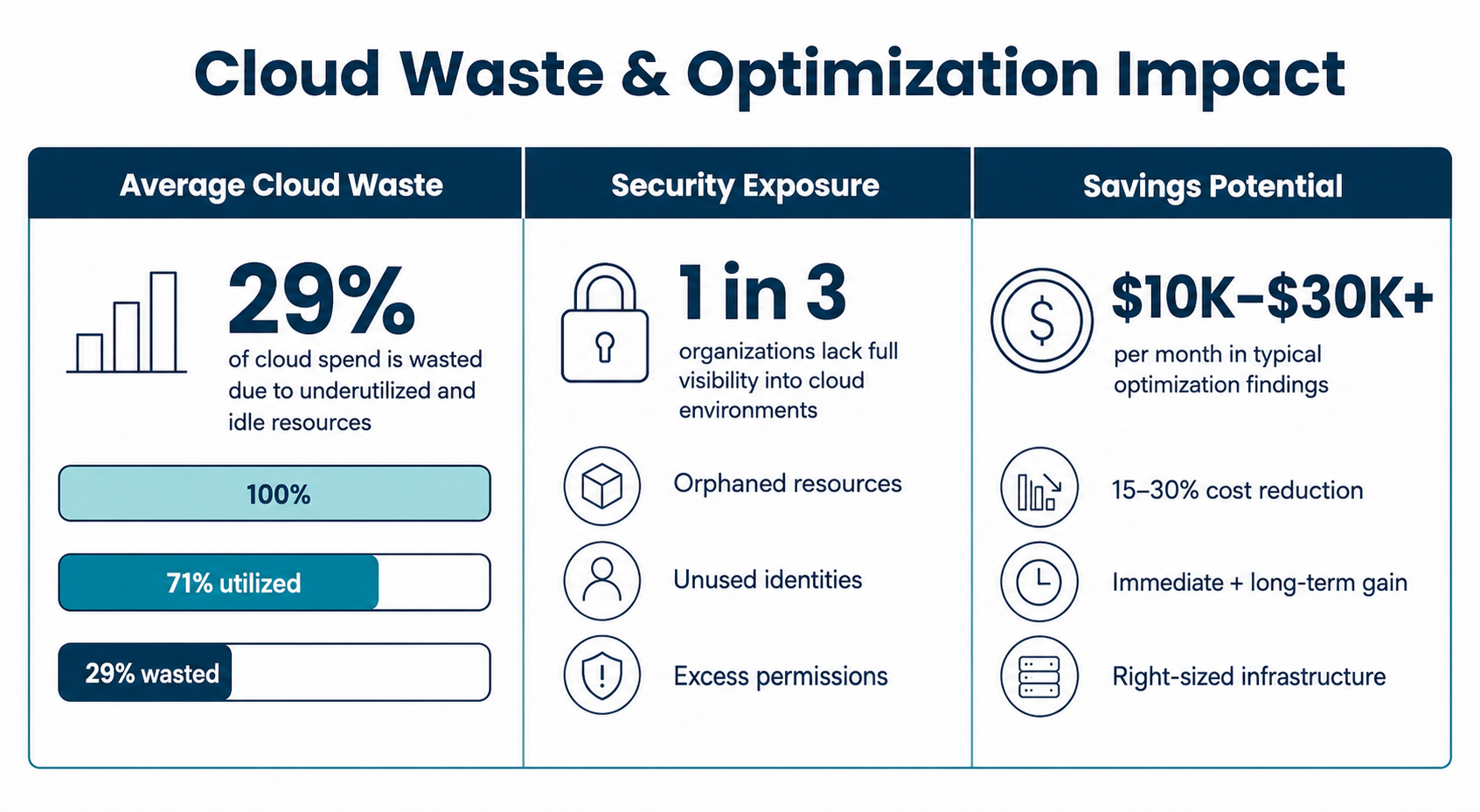
Cloud Waste Optimization

Real-World Examples of Cloud Optimization in Action

Here’s what organizations often uncover when they reassess their cloud environments:

Idle Compute Waste

In one Azure environment, Bluewave identified over 100 powered-off VMs still generating charges, resulting in $10,007/month in projected savings through retirement of unused compute and associated storage.

License Waste

One client uncovered $29,701/month in avoidable recurring spend due to overlapping Microsoft 365 licenses and active licenses assigned to disabled users.

Security + Cost Exposure

Another organization discovered 49.5% of storage accounts allowed anonymous access, 93.3% of key vaults lacked purge protection, and cloud spend was running 313% over budget. All within a single Azure environment.

Is Your Cloud Environment Showing These Signs?

If several of these warning signs feel familiar, the next step is not just confirming that your environment has become harder to manage. It is understanding where that complexity is quietly turning into unnecessary spend.

In our next article, we break down five of the most common sources of wasted cloud spend IT teams miss until the costs are already adding up.

Schedule Your Cloud Assessment Today

Discover where your cloud environment may be costing more than it should.

Our Cloud Assessment framework helps organizations:

  • Identify hidden cloud waste
  • Improve security posture
  • Strengthen governance controls
  • Optimize infrastructure performance
  • Build a strategic roadmap for future growth

FAQs: Cloud Management Strategy and Governance

Q: What is cloud management?

A: Cloud management is the process of monitoring, governing, optimizing, and securing cloud infrastructure, applications, and costs across public, private, and hybrid cloud environments.

Q: Why is cloud management important?

A: Cloud management helps organizations control spending, improve security, maintain compliance, and ensure cloud resources align with business objectives.

Q: How do I know if my cloud environment is inefficient?

A: Signs of cloud inefficiency include rising costs, idle resources, weak security controls, inconsistent governance, and poor visibility into infrastructure performance.

Q: What causes cloud waste?

A: Cloud waste is commonly caused by overprovisioned resources, unused virtual machines, orphaned storage, duplicate licenses, and lack of governance policies.

Q: What is cloud governance?

A: Cloud governance is the framework of policies, controls, and standards used to manage cloud usage, spending, security, and compliance.

Microsoft 365 E7: What IT Leaders Should Evaluate Before Renewal

Microsoft 365 E7: What IT Leaders Should Evaluate Before Renewal

Microsoft 365 E7, also called “The Frontier Suite,” is now generally available. For IT leaders, the question is not whether to upgrade everyone. It is where E7 may create real value, which users should test it first, and what would justify broader adoption.

E7 brings together Microsoft 365 E5, Copilot, Agent 365, Entra Suite, security, compliance, identity, and AI governance. That makes it more than another licensing tier. It is a decision point for how your organization wants to manage AI, agents, security, and productivity across the Microsoft ecosystem.

For some organizations, E7 may simplify licensing and accelerate AI maturity. For others, it may add cost before the business is ready to use the capabilities well.

That is why IT leaders should evaluate E7 before renewal pressure builds. The goal is not to make E7 the default. It is to know where E7 fits, where E3, E5, Copilot, or standalone add-ons still make more sense, and whether a targeted pilot can prove the business case.

What is Microsoft 365 E7?

Microsoft 365 E7 is Microsoft’s new top-tier enterprise suite designed to bring together productivity, AI, security, identity, compliance, and agent governance in one SKU.

It unifies Microsoft E5, Microsoft Copilot, Entra Suite, and Agent 365 into one SKU.

Here’s a look at E7 versus other Microsoft 365 SKUs:

Microsoft 365 E7 vs Other SKUs
Plan M365 E7
(with Teams)
M365 E7
(no Teams)
M365 E5
(with Teams)
M365 E5
(no Teams)
M365 E3
(with Teams)
Agent 365
Price (USD) $99.00/user/mo $90.45/user/mo $57.00/user/mo $36.00/user/mo $15.00/user/mo
Office Apps Full suite Full suite – Teams omitted Full suite Full suite – Teams omitted Full suite N/A
Copilot AI Included Included Add-on ($30) Add-on ($30) Add-on ($30) N/A
Agent Management Yes Yes No No No Yes
Identity Entra Suite Entra Suite Azure AD P2 (via E5) Azure AD P2 (E5 no Teams) Azure AD P1 (via E3)
Adv. Security Yes Yes Yes Yes Limited N/A

Where Microsoft 365 E7 May Create Value

For some enterprises, Microsoft 365 E7 could be the right next step.

Here are a few scenarios where E7 can create a real upside:

  • You’re already committed to E5, Copilot and advanced identity/security
    If you are licensing E5, rolling out Copilot broadly, and piloting Entra Suite, Defender, Purview, and Intune at scale, E7 can bring those capabilities into one SKU. With Microsoft reporting that 90% of Fortune 500 companies use Microsoft 365 Copilot, AI is clearly becoming part of the enterprise roadmap.
  • Your procurement and budgeting could get simpler
    Aggregating AI, identity, security, and compliance into a single suite may reduce the number separate licenses, add-ons, and contract decisions your team has to manage.
  • You may be able to reduce overlap with third-party tools
    If E7 lets you retire specific point products in areas like data loss prevention, identity governance, or endpoint protection, the total cost picture may look better than the license price suggests. That only works if you have a clear plan to assess, replace, and decommission overlapping tools.
  • Your AI agents need a stronger governance model
    Agent 365 and Entra Suite give you a consistent way to register, secure, and monitor agents. For organizations building AI-driven workflows, that structure may become increasingly important.

For the right organization, Microsoft 365 E7 may provide a cleaner path to enterprise AI. But the value depends on whether the business has the use cases, adoption plan, governance model, and license strategy to support it.

Agent 365 May Be the Bigger Story

Agent 365 may become the most important part of E7, because Microsoft positions it as a control plane for AI agents, where you can:

  • Inventory and register agents
  • Assign identities and sponsors
  • Apply security and access policies
  • Monitor behavior and logs
  • Manage lifecycle and decommissioning

That matters because AI is moving to agents that can act: send emails, update records, move files, trigger workflows, and interact with other systems.

As that shift happens, governance questions become much more urgent:

  • Who owns AI agent governance in your organization?
  • How will agents be inventoried and tied to business owners?
  • What data and systems can each agent access, and under what conditions?
  • How are agent actions logged, monitored, and escalated when something looks wrong?
  • How will you discover or block shadow AI agents that users create without approval?
  • Who has authority to approve agents before they interact with sensitive or regulated data?

E7 brings Agent 365, Entra Suite, Defender, and Purview into one stack to help answer those questions.

The Risk: Buying Before You Are Ready

This is where E7 needs a disciplined evaluation.

E7’s biggest risk is paying for advanced capabilities before your organization is ready to turn them into business outcomes.

If Copilot adoption is still uneven and only a fraction of licensed users are active, scaling to E7 amplifies cost before you have validated value. Many organizations also struggle to fully deploy Defender, Purview, and advanced E5 security features. Moving to E7 without closing those gaps simply layers AI on top of unused capacity.

Overlap is another issue. Mature third-party tools for endpoint, identity, DLP, or SIEM can make E7 feel redundant. Despite this, consolidation may still be the right move, but only if you have a clear decommission plan and risk assessment.

E7 also assumes you are ready to treat AI as part of your control framework, with policies, approvals, monitoring, and incident response. If your governance model for AI is still “to be defined,” a premium AI suite is premature.

Finally, blanket licensing is an easy path to shelfware. Applying E7 to entire populations “just in case” is the fastest way to overspend, because knowledge workers, frontline staff, developers, and executives rarely need the same mix of capabilities.

Microsoft 365 E7 doesn’t lack value. But you need to be sure you aren’t paying for frontier capabilities before your organization has the readiness, governance, and adoption model to turn them into measurable outcomes.

What To Assess Before You Move to E7

Before you decide whether Microsoft 365 E7 belongs in your roadmap, you need clear visibility into your current state. This is where many organizations discover unexpected risk or opportunity.

Use this checklist as a starting point:

  • Current usage across core services: How are you using E3, E5, Copilot, Entra, Defender, Purview, and Intune today? Where are the real adoption hotspots, and where are licenses going unused?
  • Unused or underused licenses: How many seats are assigned but rarely used? Where could you reclaim or right-size before adding E7 capacity?
  • Security and identity tool overlap: Which capabilities are covered twice: once by Microsoft, once by third-party tools? What would it take to consolidate safely, and over what timeline?
  • User segmentation for E7: Which user groups truly need E7 (for AI, security, or compliance reasons)? Where would E3 or E5 plus targeted add-ons still be sufficient?
  • Copilot adoption and measurable use cases: Where is Copilot delivering real value today (time saved, errors reduced, throughput improved)? Which scenarios should be proven before expanding to a broader population?
  • AI agent governance readiness: Do you have policies, owners, and workflows for AI agents today? Can you answer “which agents touch our sensitive data” with confidence?
  • Commercial path and timing: Can you pilot or add E7 for select users before your next renewal? Review your agreement terms, eligible upgrade paths, pricing impact, and timing so you can evaluate E7 now without assuming it has to be an all-or-nothing renewal decision.

A structured assessment gives you options. It lets you decide when and where E7 makes sense.

We Can Help: Know Where to Upgrade, Get Visibility

Microsoft 365 E7 may be the right move for some users, teams, or business units, but it should not become the default without a clear case.

Before renewing, make sure you understand what you own across E3, E5, Copilot, Entra, Defender, Purview, Intune, and related add-ons.

Analyze what you use and where adoption lags. Identify where tools overlap, especially in security, identity, compliance, and endpoint. Decide which users truly need premium AI, security, identity, and governance capabilities, and which do not.

We help organizations assess Microsoft licensing and usage in detail, evaluate AI and agent readiness across people, process, and technology, identify optimization opportunities and consolidation scenarios, and build practical, data-driven renewal strategies.

If you want a clear view of your options, we can help you get there.

Microsoft 365 E7 FAQ

Q: What is Microsoft 365 E7?

A: Microsoft 365 E7 is Microsoft’s premium enterprise suite designed to bring together productivity, AI, security, identity, compliance, and agent governance capabilities. It includes Microsoft 365 E5, Microsoft 365 Copilot, Microsoft Entra Suite, and Agent 365.

Q: How much does Microsoft 365 E7 cost?

A: Microsoft has cited Microsoft 365 E7 pricing at $99 per user per month.  Agent 365 is also available as a standalone license at $15 per user per month. Final pricing may vary based on agreement type, terms, geography, and licensing structure.

Q: Is Microsoft 365 E7 right for every user?

A: No. For most organizations, E7 makes the most sense for specific users based on their role, security needs, AI use cases, and overall readiness. Some employees may benefit from E7, while others may be better served with E3, E5, frontline licenses, or a few targeted add-ons.

Q: What should IT leaders look at before moving to E7?

A: IT leaders should review current Microsoft license usage, Copilot adoption, E5 utilization, security and compliance tool overlap, identity maturity, AI governance, and renewal timing. The goal is to understand where E7 creates value before making a broader licensing decision.

Q: What is Agent 365?

A: Agent 365 is Microsoft’s control plane for AI agents. It is designed to help organizations govern, secure, observe, and manage agents across the enterprise, including emerging shadow AI risks.


Broken Workflows Are Hurting Your Employee Experience

The Hidden Employee Experience Cost of Broken Workflows

Employee experience is under pressure, and instead of looking at engagement surveys and benefits programs, enterprises need to look at the work itself. The real issues sit inside everyday workflows that are slow, fragmented, and hard to fix.

Those broken workflows do more than hurt productivity. They erode trust, fuel burnout, and make your best people feel like expensive bots clicking through bad systems. Leaders respond by buying more SaaS, mapping more processes, and launching more AI pilots, but if done improperly, these actions only add more complexity and frustration.

When enterprises look at workflow debt as an employee experience problem first, they uncover the hidden human cost of broken work and start building smarter, AI-ready processes that employees want to use.

Broken Work Is an Employee Experience Problem

When workflows are clumsy, slow, or unclear, people feel it long before the metrics show it.

Look at the numbers:

If leaders care about engagement and retention, they need to fix the work itself.

What “Broken Work” Looks Like Inside the Enterprise

Broken workflows are often hiding in plain sight. They show up as everyday friction that people learn to work around instead of escalating.

Common patterns include:

Customized SaaS workflows that don’t line up: Each application runs its own version of the process. Sales, finance, and operations all think they are following the same steps, yet the tools enforce different rules and data paths.

Manual process mapping that is always out of date: Teams spend months documenting flows in slides and diagrams, only to watch them fall behind reality as soon as something changes. Static process maps cannot keep up with real work in dynamic environments.

Limited ground truth about how work happens: Shadow processes, spreadsheet trackers, and side conversations become the real system of record. This appears as tribal knowledge filling gaps and leaders believing one thing is happening while frontline employees experience something very different.

When this pattern repeats across departments, the employee experience degrades, even if the tech stack looks impressive on paper.

The Human & Business Cost of Broken Workflows

The employee experience impact of broken work shows up as a slow, steady erosion of energy, focus, and trust.

  • Cognitive load and context switching: Employees juggle fragmented tools, logins, and processes to complete basic tasks. They spend as much time working around systems as working within them, driving decision fatigue and constant reorientation.
  • Loss of agency and craftsmanship: Knowledge workers become “swivel chair” operators, copying data between systems and chasing approvals instead of applying their expertise. Over time, this undercuts pride, motivation, and psychological safety.
  • Burnout, attrition, and quiet quitting: Broken workflows are an early warning sign of disengagement. People who spend their day wrestling with bad processes are more likely to burn out or leave. The organization then absorbs the compounding cost of recruiting, onboarding, and retraining new hires.
  • Erosion of trust in leadership and technology: Each new tool that fails to make work easier adds to a sense of “another initiative that didn’t deliver.” Employees grow skeptical of transformation programs and hesitate to adopt new solutions.

The overall effect becomes a rising hidden EX cost that rarely shows up in project business cases and yet still hits the P&L hard.

The cost becomes more visible when workflow health is connected to business metrics, including:

Employee facing signals

  • eNPS and engagement scores holding flat or declining, even after new benefits or programs
  • Negative patterns in help desk sentiment and open-ended survey comments
  • Onboarding time to productivity and time to real expertise stretching longer than expected

Operational signals

  • Cycle times creeping up, even with more headcount
  • Backlog volume, handoff failures, and error rates that remain stubbornly high
  • Productivity gains left unrealized because employees are stuck in manual, repetitive work

Customer-facing signals

  • CSAT and NPS erosion driven by slow response times and inconsistent outcomes
  • Clear links between frustrated employees, inconsistent service, and lost revenue

Looking at EX and business metrics together helps build a stronger case for tackling workflow debt.

Why More SaaS and Random Automation Don’t Fix the Problem

Many enterprises have tried to fix broken work by adding more tools. Each new application implements its own version of the process. Automation is configured in silos, with local optimizations that don’t respect the end-to-end journey.

Now, AI has the power to compound silos. Departments buy their own AI tools independently, just as they did with SaaS. Without shared guardrails and a clear orchestration model, the enterprise risks recreating the SaaS sprawl problem at AI speed.

To unlock real employee experience and productivity gains, organizations need a different starting point.

How to Fix Broken Workflows Before Automating Them

The shift leaders need is simple to describe and challenging to deliver: move from “automate tasks” to “fix work for people.”

That begins with the lived employee journey across tools and departments. Rather than designing from system boundaries, you trace how work actually flows between people, channels, and applications.

Productivity Discovery as the Foundation

Productivity Discovery uses process monitoring and mining to reveal how people, processes, and systems operate today. It surfaces bottlenecks, rework, and hidden paths, then couples this insight with automation recommendations and ROI projections.

From there, you can prioritize high-value workflows at the intersection of frequency, friction, and value. Onboarding, IT support, HR case management, and sales operations are typical early candidates.

A practical blueprint includes:

Step 1: Identify high-value EX impacting processes: Engage HR, operations, risk, and frontline teams to source use cases. Look for high-volume, error-prone, multi-team workflows where employees consistently express frustration.

Step 2: Pilot with purpose: Select a narrow use case with clear success metrics, such as time saved, error reduction, and measurable EX lift. Treat this as a learning vehicle.

Step 3: Build the foundation: Invest in API-ready systems and unified data or knowledge layers that can support automation at scale. Map current and future state workflows with business users actively involved so designs reflect real work, not idealized diagrams.

Step 4: Scale strategically: Reuse automations across departments. Establish a governance model that includes EX owners and frontline representatives, so changes stay grounded in human impact.

Step 5: Measure and optimize continuously: Track KPIs such as cycle time, throughput, compliance, CSAT, and eNPS. Hold quarterly reviews to refine workflows and capture new opportunities.

This blueprint keeps EX at the center while still delivering hard productivity gains.

Designing an AI-First Workforce That Elevates Employee Experience

Once the right foundation is in place, AI can become a powerful ally for employee experience.

In a traditional operating model, humans perform nearly all operational tasks, with scattered automation that speeds up only small parts of the process. In an AI-first model, AI employees execute workflows end-to-end, while humans supervise policies, handle edge cases, and focus on high-value work.

A structured AI employee process usually follows four stages:

  • Identify broken work and target workflows.
  • Transform by optimizing and orchestrating work with automation and AI.
  • Validate and measure by managing change and tracking impact with on-platform analytics.

To protect employee experience, AI must operate with strong human oversight. That includes clear business rules, explainability, and human-in-the-loop controls for high-risk decisions. Done well, AI shifts employees from “doing the work” to “directing the work,” which can significantly improve engagement.

Keep Employee Experience as the North Star

Fixing broken workflows requires coordinated leadership across HR, operations, and technology. The goal is not just faster processes or more automation. It is simpler work, fewer errors, stronger trust in technology, and employees who can spend more time on the work they were hired to do.

That keeps workflow change anchored in human outcomes, not just technology deployment.

How Bluewave Helps Enterprises Find, Fix, and Optimize Broken Work

Addressing the hidden employee experience cost of broken workflows requires both strategic clarity and practical execution. That is where Bluewave can help.

As your technology advisor, we provide independent guidance across customer experience, cloud, security, network, and AI. Our experts help enterprises move from fragmented investments to a clearer roadmap that aligns workflows, platforms, and people.

We support clients through:

  • Technology assessment and strategic sourcing that aligns spend with real workflow needs
  • Vendor management and expense optimization tied directly to EX and CX outcomes
  • Ongoing advisory to measure impact, refine automations, and keep people at the center of design

If you are ready to confront the hidden cost of broken workflows, start by looking at how work truly happens in your organization. From there, you can build a roadmap that turns workflow debt into a competitive advantage for your people and your business.

Start by reaching out to our team for a discovery conversation.